Does Email Warm Up Work? What It Fixes, What It Can't, and Who Can Skip It
does email warm up workdo email warmup tools really workdo email warming services work
Does Email Warm Up Work? What It Fixes, What It Can't, and Who Can Skip It
Does email warm up work? See what warmup fixes, what it can't, who can skip it and what happens if you stop, using 2025 and 2026 provider and benchmark data.
Does Email Warm Up Work? What It Fixes, What It Can't, and Who Can Skip It
By Subramanya Kamath, Co-founder of TargetGrid
Email warmup works for one specific job: building sender reputation on a new or quiet mailbox so real outreach is less likely to land in spam, but it cannot repair bad lists, spammy copy or broken authentication.
A founder with one domain has no backup inbox, so a bad first send hurts. Does email warm up work for your setup? Yes for a brand-new or dormant mailbox that will send cold outreach. Mostly no for an established domain, or for someone sending a handful of real emails a day. This guide separates provider evidence from vendor claims, shows who can skip warmup, and explains what happens if you stop. For timelines, see how long email warmup takes.
Key Takeaways
Email warmup builds sender reputation on a mailbox with no sending history. It does not fix bad lists, spammy copy or missing SPF, DKIM and DMARC.
No independent, controlled test of pool-based warmup networks was found. Most "warmup works" numbers come from warmup vendors.
Email warmup is usually unnecessary for a mailbox sending a handful of real emails a day, since Outlook.com's bulk rules start above 5,000 emails per day.
Stopping warmup does not erase reputation. Provider scoring follows complaints, bounces and replies from real recipients.
Diagnose in order: authentication, list quality, complaint rate, volume ramp, then tooling.
Does email warm up work?
Email warmup works for one narrow job: it helps a new or dormant mailbox build sender reputation before real outreach starts. It does not fix bad lists, spammy copy or broken SPF, DKIM and DMARC records. No independent, controlled test of third-party warmup networks was found, so the strongest evidence comes from mailbox provider guidance, not vendor claims.
A single new brass mailbox standing alone on an empty gravel road at dawn
Email warmup is the practice of gradually increasing send volume from a new mailbox while generating positive signals such as replies, so mailbox providers learn to trust it. Sender reputation is the trust score a mailbox provider assigns to a mailbox and domain based on its sending history and recipient behaviour.
Our data: skale.email has no published customer metrics yet, so there is no first-party performance figure to show here. The company's own framing of the stakes is qualitative: teams lose weeks rebuilding reputation after a bad first send. Read that as the company's observation, not a measured result.
Why a new mailbox starts with no trust
Microsoft says it plainly: "Mailbox providers view email from a new domain as suspicious until the new address establishes a positive sending reputation." (Microsoft Learn, 2025)
Providers have good reason. Spamhaus counted 43.5 million new domains registered between April and September 2025, and domain listings surged by 48.3% over the same six months (Spamhaus Project, 2025). A domain that appears from nowhere and sends at volume looks like abuse.
What the evidence actually says
Provider guidance supports a gradual ramp. Microsoft's guidance says "Achieving maximum deliverability takes four to eight weeks, depending on the targeted volume and engagement." (Microsoft Learn, 2025) That page is written for high-volume marketing senders, so treat the window as an outer bound for a solo operator, not a promise. An Adobe practitioner adds: "Every new sending domain or subdomain needs its own careful ramp-up." (Adobe Experience League Community, 2025)
Notice what is missing. Neither source mentions a third-party warmup network. The ramp is supported. The tool is a separate question.
Placement has also improved without any single fix. Validity ties its rise to sender rules: "The global inbox placement rate increased by 3.7% year over year in 2026" (Validity, 2026). Authentication and compliance rules are moving the baseline more than warmup is.
For the basics in short form, the earlier overview of whether warmup works is a quick companion read.
What can email warmup fix, and what can't it?
Email warmup can fix one problem: a mailbox with no sending history that providers treat as unknown. It cannot fix list quality, spam complaints, weak copy or missing authentication. Unspam's 2026 benchmark found 88% of tested emails scored under 3.0 on SpamAssassin, yet only 66% reached the inbox or a tab (Unspam.email, 2026).
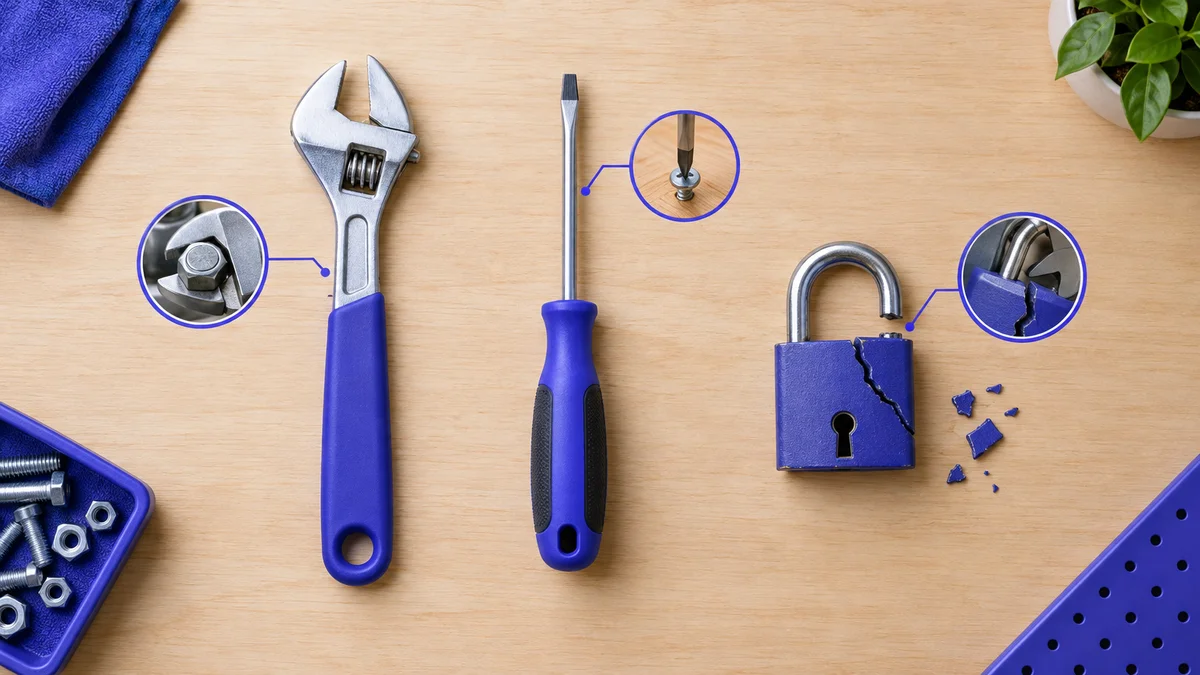
A toolbox of repair items laid out on a bench, with one broken lock set apart
That 22-point distance shows why clean content alone does not guarantee placement. Warmup does not close it either. The table maps common problems to the real fix.
Problem
Does warmup fix it?
What fixes it
New mailbox, no sending history
Yes, partly
A gradual ramp to engaged recipients
Missing or failing SPF, DKIM, DMARC
No
Correct DNS records and alignment
Bad or scraped list, high bounces
No
List cleaning, verified contacts
High spam complaints
No
Better targeting, easy opt-out, relevant copy
Spammy subject lines or body copy
No
Rewriting the message
Sudden jump in daily volume
No
A written ramp plan with caps
SPF, DKIM and DMARC are three DNS-based authentication standards that let a receiving server confirm an email really came from the domain it claims. A missing record cannot be warmed away.
Placement is uneven even for good senders
Validity reports a global inbox placement rate of 87.2%, so roughly 1 in 8 commercial emails still misses the inbox even for authenticated senders (Validity, 2026). Of the mail that misses, Validity's spam placement rate is 6.1% and its missing rate (blocked or rejected) is 6.6% (Validity, 2026). A warmup "health score" does not measure blocked mail.
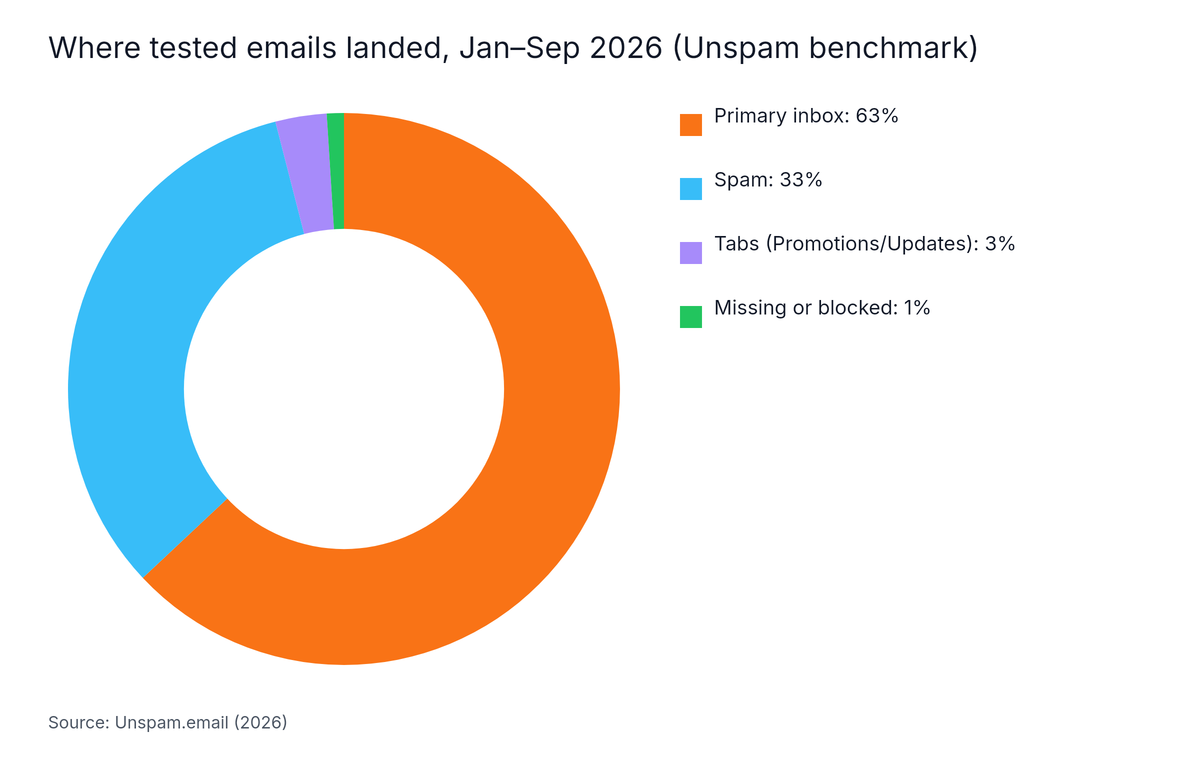
Unspam's January to September 2026 tests show the mix for mixed-quality senders: 63% inbox, 33% spam, 3% tabs and 1% missing or blocked (Unspam.email, 2026). This is a single-vendor benchmark.
Donut chart: Where tested emails landed, Jan–Sep 2026 (Unspam benchmark). Highest: Primary inbox at 63%.
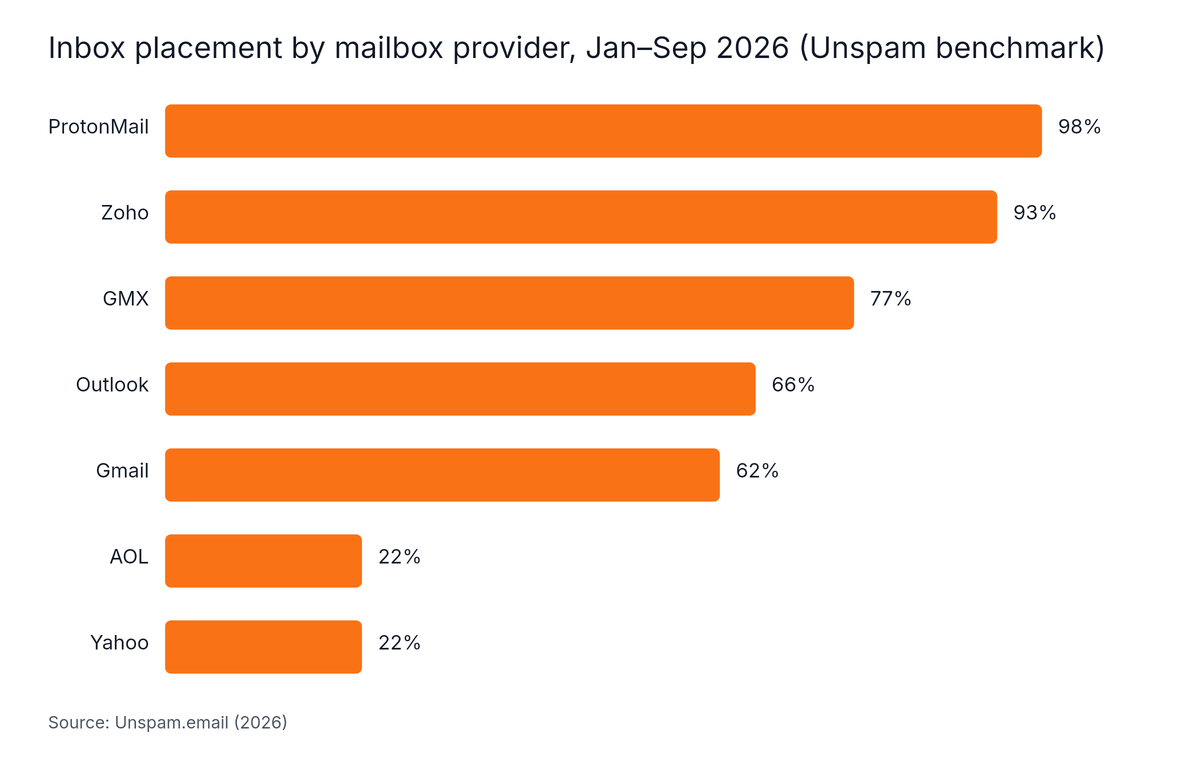
Unspam's data shows mailbox providers differ sharply: Outlook placed 66%, Gmail 62% and Yahoo and AOL only 22% each (Unspam.email, 2026). One warmup score cannot predict all of those.
Horizontal Bar chart: Inbox placement by mailbox provider, Jan–Sep 2026 (Unspam benchmark). Highest: ProtonMail at 98%.
Do email warmup tools and warming services really work?
Email warmup tools work as ramp schedulers and monitors, but no independent evidence shows that pool-based warming networks lift real inbox placement. Microsoft says a new domain needs four to eight weeks to reach maximum deliverability (Microsoft Learn, 2025), and it does not endorse third-party networks. Treat round warmed-versus-unwarmed figures that state no method with suspicion.
A hand holding a magnifying glass over a printed benchmark chart on a desk
The "warmup works" numbers found in the research all came from warmup vendors. None came from a mailbox provider or a peer-reviewed study. The only measured baseline is Validity's 87.2% global inbox placement rate (Validity, 2026), which says nothing about warmed versus unwarmed mailboxes.
What a tool can honestly do
A good tool enforces daily caps, spaces sends, simulates replies and shows mailbox health across accounts. That saves time past a few inboxes. What a sequence sends matters too: see what a warmup sequence actually sends. Tools that repeat the same text, send on mechanical timing or loop the same networks are closer to automated noise. For options, see what to look for in warmup tools.
Which benchmark number means what
Blogs often mix up benchmarks that measure different things.
Share scoring under 3.0 on SpamAssassin vs reaching inbox or a tab
None of these compares warmed and unwarmed mailboxes. They are baselines, not proof that warmup works.
How to test it yourself
A seed test is an inbox placement check that sends a message to test mailboxes at several providers and records whether each lands in the inbox, a tab or spam. Run one before the ramp, after two weeks and after four. Compare providers separately, since Gmail and Outlook diverge. For tools that test and monitor, see email deliverability tools for cold outreach.
Is email warmup necessary if you only send a handful of emails a day?
Email warmup is usually not necessary for a mailbox that sends a handful of real emails a day to people who know you. Microsoft's Outlook.com rules apply to domains sending more than 5,000 emails per day (Microsoft Defender for Office 365 Blog, 2025), so a solo sender sits far below the threshold.
A founder at a small kitchen table writing a short list of contacts by hand
Microsoft has rejected mail from non-compliant senders at that volume since May 5, 2025, sending to Outlook.com, Hotmail and Live, and it requires SPF, DKIM and DMARC (dmarcian, 2025). Low-volume senders are not in scope, but the rules show where providers are heading. Set up authentication anyway.
Sender situation
Warmup needed?
Why
Brand-new domain, cold outreach planned
Yes, a ramp
No history, providers are suspicious
New mailbox on an established, healthy domain
Often a short ramp
The mailbox itself has no history
A handful of real emails a day to known contacts
Usually no
Real replies warm the mailbox on their own
Domain that has sent steadily for months
No
History already exists
Dormant mailbox restarting after a long gap
Yes, a ramp
Reputation has gone stale
A founder-friendly manual ramp
You can do the ramp by hand. Send to colleagues, customers and friends who will reply. Add volume in small steps, and hold steady when replies slow or bounces appear. Microsoft's four to eight weeks for a new domain is the outer frame (Microsoft Learn, 2025), though that guidance targets high-volume marketing senders. Split your own window into three parts. The send counts are not sourced, so set them from your own bounce and complaint data.
Stage
Share of your window
What to do
Who receives the mail
Early
First third
Send a very small number, then hold
Contacts who will reply
Middle
Middle third
Add volume in small steps while bounces stay low
Known contacts, plus a few warm leads
Later
Final third
Introduce a small cold slice, widen it only if complaints stay low
Mostly warm leads, then cold
Any stage
Anytime
Pause and diagnose if bounces or complaints rise
No new recipients until fixed
Spam complaint rate is the share of delivered emails that recipients mark as spam. At low volume, a couple of complaints move that percentage a lot. For Outlook, Microsoft 365, Zoho or custom SMTP setups, see how to warm up SMTP mailboxes.
What happens if you stop email warmup?
Stopping email warmup does not make a healthy mailbox lose its reputation overnight, because mailbox providers score ongoing recipient behaviour: complaints, bounces and replies. Red Sift, summarising Google's sender guidelines, puts the spam rate target below 0.1% and the ceiling at 0.3% (Red Sift, 2025). Sudden volume jumps or rising complaints are the real risk.
A kettle taken off a stove with steam fading in a quiet kitchen
Why the claims on both sides are weak
One camp says to run warmup forever. Another says the transition is the danger. Neither cites provider guidance. No provider source found for this article publishes a decay timeline for reputation after warmup ends, so claims like "reputation drifts down in four to six weeks" are unsourced.
The mechanism that matters
Warmup traffic is a proxy for real engagement. When real recipients open, reply and rarely complain, they supply the signal themselves. Warmup mail can pad a thin record, but it cannot offset complaints from real people.
A safer way to stop
Move to real outreach in small slices rather than a single flip.
Keep daily volume within your written caps.
Watch bounces, replies and complaints weekly.
If placement drops, pause new sends and diagnose before adding volume.
How do you tell whether email warmup is working?
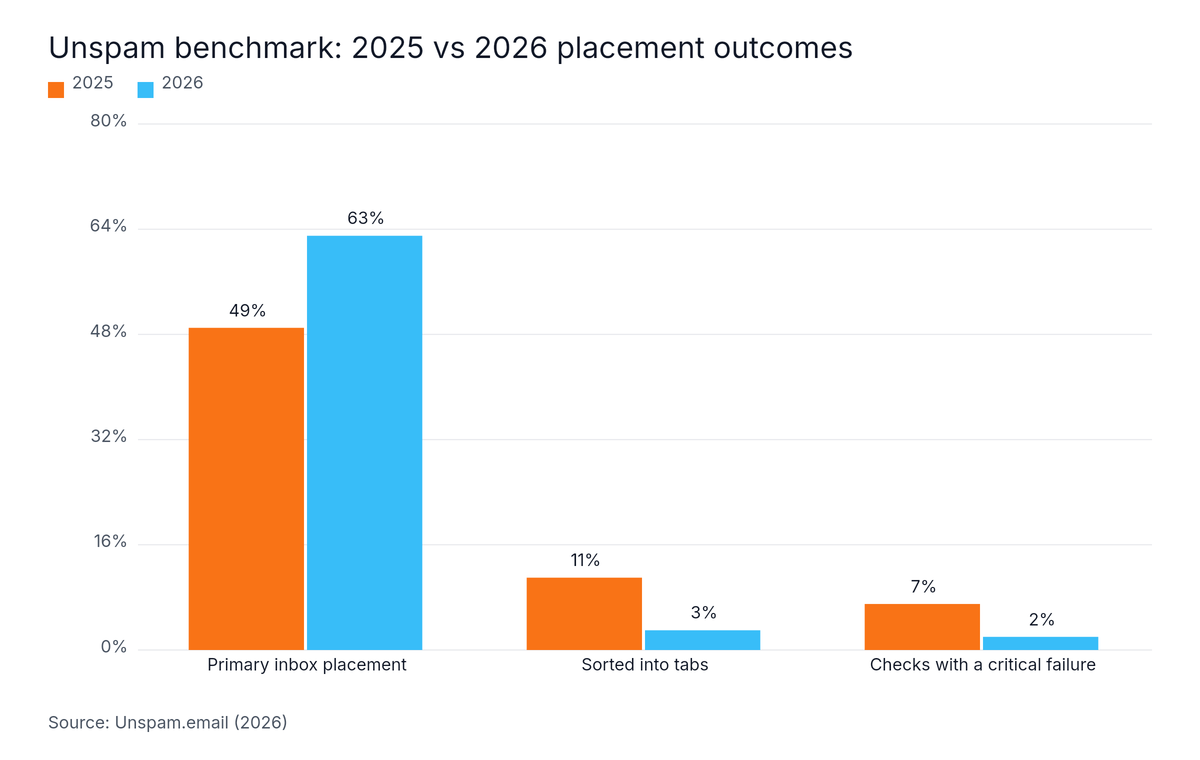
To tell whether email warmup is working, run a seed or inbox placement test before and after the ramp, and fix problems in a fixed order: authentication, list quality, complaint rate, volume ramp, then optional tooling. Unspam's data shows critical deliverability-check failures fell from 7% in 2025 to 2% in 2026 (Unspam.email, 2026).
Setup errors are shrinking, but they still cost placement, so check them first. The same Unspam report shows primary inbox placement rising from 49% in 2025 to 63% in 2026, while the share sorted into tabs fell from 11% to 3% (Unspam.email, 2026).
Grouped Bar chart: Unspam benchmark: 2025 vs 2026 placement outcomes. Highest: Primary inbox placement at 49%.
Authentication: confirm SPF, DKIM and DMARC pass and align on every send.
List quality: remove invalid addresses and anyone who never expected your mail.
Complaint rate: keep it below 0.1%, and treat 0.3% as a hard stop, per Red Sift's 2025 summary of Google's guidelines.
Volume ramp: raise daily sends in small steps and hold when metrics slip.
Optional tooling: add a warmup tool only after steps one to four are clean.
Signals to stop and diagnose
Seed-test spam placement rising for two checks in a row.
Hard bounces climbing on real outreach.
Replies falling while volume grows.
Repeated SMTP temporary errors from one provider.
Judge each ramp stage over several days, not one. One bad day is noise. A bad week is a signal.
Who is email warmup not for, and where is the evidence thin?
Email warmup is not for established domains with healthy sending history, senders with a handful of daily messages to real contacts, or anyone hoping it will rescue a bad list. Microsoft's threshold of more than 5,000 emails per day (Microsoft Defender for Office 365 Blog, 2025) shows how small a solo sender is. The evidence is thin too: the benchmarks come from single vendors.
Honest limits of this evidence
No controlled test of warmed versus unwarmed mailboxes was found.
The Unspam figures come from one vendor's tests, and the Validity benchmark does not state its sample size on the page cited.
Microsoft's warmup guidance is written for high-volume marketing senders, not solo outbound.
Most pages on this topic are written by warmup or cold-email vendors, so weigh their claims accordingly.
Warmup cannot make a domain immune to blocklists, and no tool controls what Gmail, Outlook or Yahoo decide.
Red Sift reports that from November 2025 Gmail moved from soft warnings to temporary and permanent rejections of non-compliant bulk traffic (Red Sift, 2025). That targets bulk senders, not a handful of daily emails, but it is another reason to authenticate first.
Frequently Asked Questions
Do email warmup tools really work?
Email warmup tools work as ramp schedulers and monitors that keep volume gradual and flag problems early. No independent, controlled test shows that pool-based warming networks raise real inbox placement, and the strongest numbers come from vendors. Run your own seed or inbox placement test before and after the ramp to see what changed.
Do email warming services actually work, or is it just automated noise?
Email warming services work only when they supply realistic, varied, low-complaint activity on top of clean authentication and a decent list. Repetitive, mechanical traffic is closer to noise. The Microsoft and Google guidance reviewed for this article describes gradual volume increases to engaged recipients and does not mention third-party warmup networks.
Is email warmup necessary if I only send a handful of emails a day?
Email warmup is usually unnecessary for a mailbox that sends a handful of real emails a day to people who expect them. Microsoft's Outlook.com rules target domains sending more than 5,000 emails per day, so a solo sender is far below that. Slow, genuine sending warms the mailbox on its own.
What happens if you stop email warmup?
If you stop email warmup, a mailbox keeps its reputation as long as real recipients keep engaging and complaints stay low. Providers score recipient behaviour, not warmup activity. The risk comes from sudden volume jumps or rising complaints after warmup ends, since the warmup traffic no longer offsets them.
Conclusion
So, does email warm up work? Yes for a narrow job, and no for everything else. Here is what to keep:
Warmup builds reputation on a mailbox with no history. It does not fix lists, copy or DNS.
Provider guidance supports a gradual ramp, not a specific third-party tool.
Low-volume senders to real contacts can usually skip it and ramp by hand.
Stopping warmup is safe when real engagement is healthy and complaints stay low.
Diagnose in order: authentication, list, complaints, ramp, then tools.
Your next step: authenticate your domain, run a seed test, then start a small, written ramp. If you would rather automate the ramp and health checks, try skale.email.
Written by
Subramanya Kamath
Subramanya Kamath is the Chief Executive Officer and Co-founder of Targetgrid. He helps teams grow with B2B SaaS sales technology and AI engagement tools. He also serves as a startup consultant, guiding founders on go-to-market strategy, lead pipelines, and sales automation.

 Subramanya KamathNov 7, 2026