
Blog
Does Email Warm Up Work? What It Fixes, What It Can't, and Who Can Skip It
Does email warm up work? See what warmup fixes, what it can't, who can skip it and what happens if you stop, using 2025 and 2026 provider and benchmark data.

Your domain landed on a blacklist after a volume jump. Learn how to check Spamhaus, submit removal requests, and rebuild sender reputation step by step.
 Subramanya KamathNov 3, 2026
Does email warm up work? See what warmup fixes, what it can't, who can skip it and what happens if you stop, using 2025 and 2026 provider and benchmark data.

How to warm up email in four weeks: setup order, a week-by-week schedule, stop-and-hold limits and a realistic date for your first cold campaign.
Step-by-step guide to adding the right SPF record for Google Workspace, configuring DKIM and DMARC on GoDaddy, and verifying your setup with free tools.
Request a quote and our experts will contact you within 24 hours with tailored solutions and pricing.
You can also send us a quick email at support@skale.email.
skale.email
Last updated: Nov 3, 2026
By Subramanya Kamath, CEO and Co-founder of skale.email - email deliverability infrastructure and cold outreach strategy.
Email blacklist removal is the process of identifying which DNS-based blocklist has flagged your sending domain or IP address, fixing the root cause that triggered the listing, and submitting a verified delisting request to the list operator so your outbound mail can reach recipients again.
Your reply rate dropped to near zero overnight. You ran a quick check and found a Spamhaus listing. Now what? Most guides tell you to "submit the removal form" and stop there. This one goes further: it covers what each Spamhaus sub-list means, what to do in the first 24 hours, how to handle shared-IP situations, and how to rebuild reputation after removal so the listing does not come back. It also addresses domain blacklists separately from IP blacklists, because a clean IP check does not always mean your domain links are clean.
Key Takeaways
- A single major-list blacklist listing can cause 20% to 70% of emails to never reach inboxes (based on major-list impact analysis across inbox providers; MailTester, 2024).
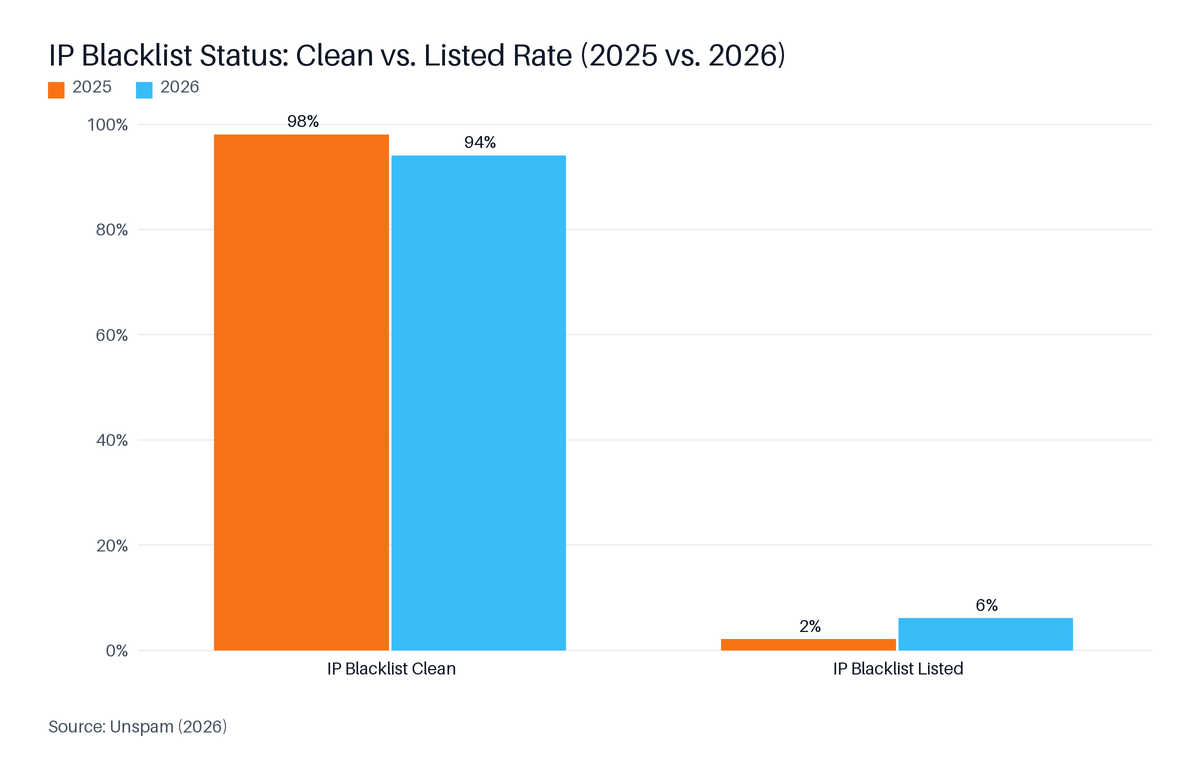
- IP blacklist listings tripled year-over-year from 2% to 6% of tested senders in 2026, driven partly by poor authentication adoption (Unspam, 2026).
- Spamhaus has five distinct sub-lists (SBL, CSS, XBL, PBL, DBL), each with its own removal process. The sub-list determines the fix required.
- Fix the root cause before submitting any removal request. Requesting delisting without a confirmed fix results in relisting within days.
- After removal, a structured warm-up re-entry over at least eight weeks is necessary to rebuild ISP reputation signals.
- 53% of senders do not actively monitor email blocklists (Sinch Mailgun, 2025), meaning most listings go undetected until campaign performance collapses.
In this guide:
An email blacklist is a real-time database of IP addresses, sending domains, or URLs flagged for sending spam, generating abuse complaints, or failing authentication checks. Mail servers query these databases and reject listed senders before a message reaches any inbox. A single major-list listing can cause 20% to 70% of emails to never reach recipients, depending on which providers query that list (based on major-list impact analysis across inbox providers; MailTester, 2024).

DNS-based Blocklist (DNSBL) is a real-time database queried via the Domain Name System that allows mail servers to check whether a sending IP or domain is flagged before accepting any message. There are hundreds of DNSBLs in operation. Most are queried silently in the background by receiving mail servers, which is why senders rarely know they are listed until campaign performance collapses.
Blacklists fall into two broad categories:
Sender reputation is the aggregate score ISPs assign to your sending domain and IP based on complaint rates, bounce rates, authentication pass rates, and engagement signals. A blacklist listing is the most visible consequence of damaged sender reputation, but the underlying reputation damage persists even after a listing is removed.
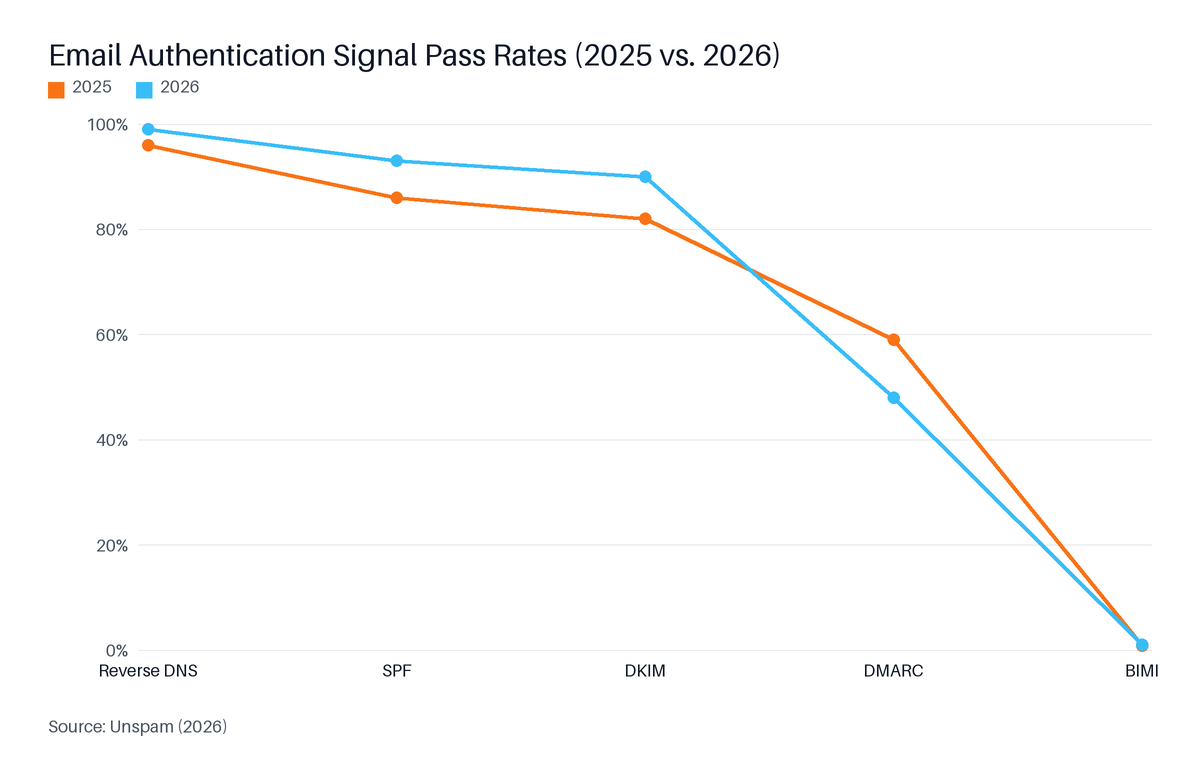
IP blacklist listings tripled year-over-year in 2026, rising from 2% to 6% of tested senders, driven partly by poor authentication adoption. DMARC pass rates fell 11 points to 48% among tested senders in the same period (Unspam, 2026). 53% of senders do not actively monitor their own blacklist status (Sinch Mailgun, 2025), meaning most listings go undetected until campaign performance collapses.
skale.email's estimate: The 53% no-monitoring rate from Sinch Mailgun's survey is consistent with the pattern described in skale.email's own product framing: "teams lose weeks rebuilding reputation after a bad first send." Most founders discover a listing through a campaign collapse, not a monitoring alert - the listing has typically been active for days before a reply-rate drop makes it visible.
"IP blacklist listings rose from 2% of tested senders in 2025 to 6% in 2026, while domain listings stayed rare at 0.3%." (Unspam, 2026)
Source: Unspam, 2026
Several factors are converging to make this worse:
Inbox placement rate (IPR) is the percentage of sent messages that land in the recipient's inbox rather than the spam folder or being rejected outright. The global IPR improved 3.7% year-over-year to 87.2% in 2026 (Validity, 2026). That average conceals a split: senders with proper authentication and gradual ramp practices are thriving, while those who skipped either step are absorbing the blacklist risk driving the 6% listing rate.
Source: Unspam, 2026
To check whether Spamhaus has listed your sending domain or IP, go to check.spamhaus.org and enter your domain name or the IP address your mail server sends from. Spamhaus protects over 3 billion mailboxes globally, so a listing can block email to Gmail, Outlook, Yahoo, and most business email providers (CaptainDNS, 2026). The lookup result identifies which sub-list you are on and links to the specific removal path for that zone.
Before you check, confirm you are looking up the right address. The IP in your domain's DNS records is often not the IP your outbound mail actually travels from. To find the real sending IP:
Received: header line that shows the originating IP - usually the first Received: line from the bottom of the header block.The 6% of senders with IP blacklist listings face what Unspam describes as "devastating" deliverability drops - a share that tripled compared to 2025 (Unspam, 2026). "An SBL listing usually has a severe deliverability impact because many mail servers and security gateways use Spamhaus data in connection-time filtering." (Suped, 2026). The block happens before your message body is ever evaluated. The quality of your copy or your list does not matter at that stage.
Spamhaus is the most widely queried list, but it is not the only one. Run your IP and domain through MXToolbox's blacklist checker (mxtoolbox.com/blacklists.aspx) and MultiRBL (multirbl.valli.org) to surface listings on Barracuda, SpamCop, and others simultaneously.
One important update: SORBS was a DNS blocklist service whose DNS zones were emptied and whose sorbs.net domain stopped resolving as of July 2026 (CaptainDNS, 2026). It is now entirely non-functional. If a checker still queries it, the result is meaningless. Do not include it in your triage decision.
Spamhaus publishes five distinct blocklists, each targeting a different category of sending problem. The sub-list you land on determines the root cause to fix and the removal process to follow. Removal timelines vary significantly: XBL self-service resolves in approximately 6 hours after an infection is cleaned, while SBL manual review takes approximately 48 hours after a confirmed fix and written explanation are submitted.
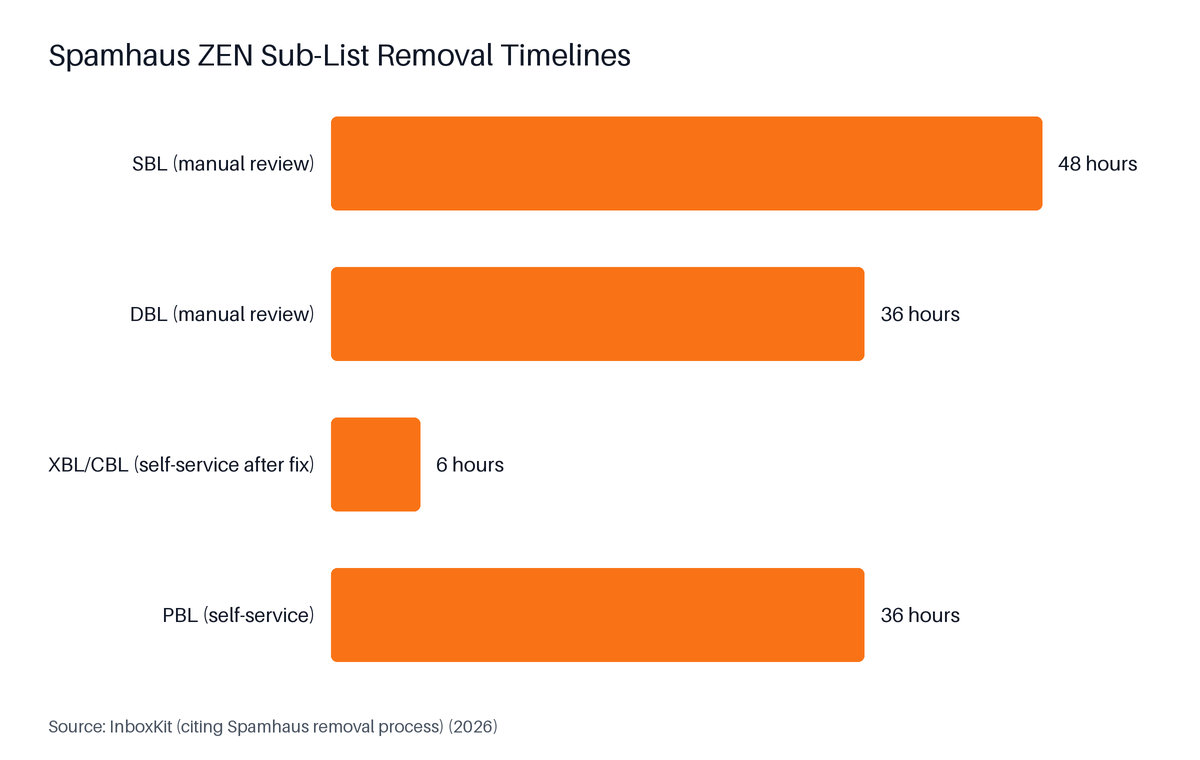
Source: InboxKit (citing Spamhaus removal process), 2026
| Sub-List | What It Flags | Common Cause | Removal Type | Typical Timeline |
|---|---|---|---|---|
| SBL (Spamhaus Blocklist) | IPs confirmed as spam sources | Sending spam; operating spam infrastructure | Manual review | ~48 hours after fix |
| CSS (Customer Spam Submit) | IPs sending bulk or low-quality email | Volume spikes; low engagement rates | Self-service (after fix) | 24-48 hours |
| XBL (Exploits Blocklist) | Compromised IPs, malware, open proxies | Infected server; compromised account | Self-service (after cleaning infection) | ~6 hours after fix |
| PBL (Policy Blocklist) | Dynamic or consumer IPs not meant to send SMTP directly | Using a broadband or dynamic IP for email | Self-service | ~36 hours |
| DBL (Domain Blocklist) | Domains in email body or links, not sending IPs | Phishing detection; domain in spam campaigns | Manual review | ~36 hours |
The Spamhaus Blocklist (SBL) is manually curated: every entry has been reviewed by a Spamhaus analyst. Getting listed here usually means your IP was verified as a source of deliberate spam, or that you operate infrastructure known to facilitate it (open relays, bulletproof hosting). Removal requires a written explanation of what you changed and why the behaviour will not recur. The Spamhaus DNSBL network now runs over 80 servers distributed worldwide, with the PBL zone rebuilt every 15 minutes and over 100 public mirror servers handling real-time queries (Spamhaus, 2026).
The Spamhaus Exploits Blocklist (XBL) lists IP addresses compromised by malware, open proxies, or exploit kits. It averages about 2 million active listings and about 650,000 new exploited-IP detections every 24 hours, with updates made in real time (Suped, 2026). If your IP is listed here, a server or connected device on that IP range is compromised. Self-service removal is available at check.spamhaus.org after you clean the infection and confirm it is resolved.
The Spamhaus Policy Blocklist (PBL) contains over 1.4 billion IPv4 addresses, covering almost 40% of the routable IPv4 space (Suped, 2026). Most of these are consumer broadband or dynamic IPs that were never intended to send SMTP directly. If you are on the PBL and you are sending from a dedicated mail server with a static IP, you have a legitimate claim for self-service removal. If your ISP submitted your IP range, you may need to contact your ISP or switch to an SMTP relay.
The Spamhaus Domain Blocklist (DBL) flags domain names appearing in email links or body content, not the IP that sent the mail. A DBL listing can appear even if your sending IP is completely clean. Founders who use tracking links or embed their primary domain in outreach emails are most exposed: if that domain gets flagged (including as a phishing vector), every email containing it is suppressed regardless of the sending IP's health.
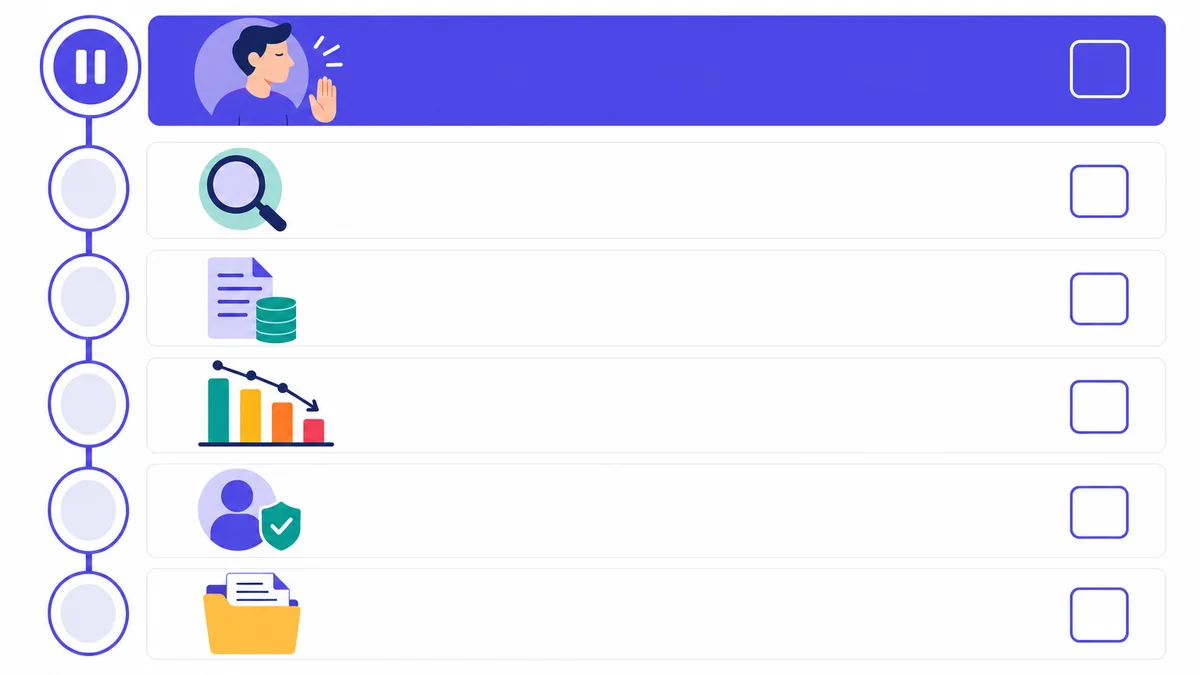
When an email blacklist listing is discovered, the first action is to pause all outbound sends from the affected domain and IP so no additional complaints accumulate against the flagged address. Then run a confirmed check at check.spamhaus.org, pull bounce logs and spam-complaint reports, and identify the specific root cause before submitting any removal request. Submitting without a confirmed fix causes relisting within days and can flag your account for slower manual review on subsequent attempts.
53% of senders have no blacklist monitoring in place (Sinch Mailgun, 2025). Most founders discover a listing through a sudden performance collapse rather than a proactive alert. Run this triage sequence in order:
If you are on a shared IP provided by your ESP, steps 1 through 5 still apply. Step 6 (submitting the removal request) is not yours to take. Skip to the Shared IP section below.
Email blacklist removal follows a fixed sequence: identify the exact list and sub-zone, fix the infrastructure or list-hygiene issue that caused the listing, gather documented proof of the fix, and submit the operator's delisting form. For Spamhaus, removal is always free. The self-service portal at check.spamhaus.org handles XBL and PBL cases; SBL and DBL require a manual review submission with a written explanation of what was fixed.
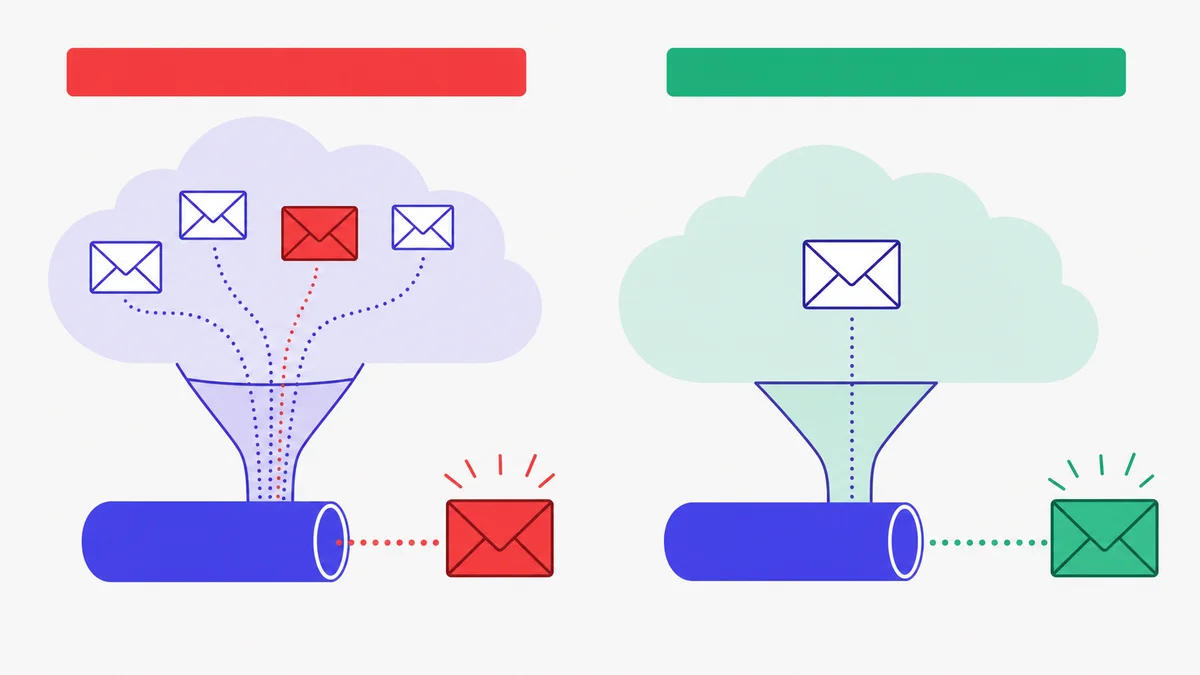
Go to check.spamhaus.org. Enter your sending IP and your domain name separately. Note every sub-list result. A single sending event can trigger listings on multiple sub-lists simultaneously - for example, XBL for a compromised server that also generated enough spam to trigger an SBL review. The Spamhaus XBL averages about 2 million active listings and 650,000 new detections per day (Suped, 2026), so the list is actively maintained and listings appear quickly after a triggering event.
Match the root cause to the sub-list:
| Sub-List | Most Common Root Cause | Fix Required |
|---|---|---|
| SBL | Sending deliberate spam; hosting spam infrastructure | Stop the behaviour; close the open relay or compromised account |
| CSS | Volume spike; low engagement; high complaint rate | Reduce volume; clean the list; fix authentication |
| XBL | Malware or compromised server on the IP | Scan and clean the server; patch the exploit |
| PBL | Dynamic or residential IP sending SMTP directly | Switch to a static dedicated IP or use an SMTP relay |
| DBL | Domain found in spam body or phishing reports | Remove or change the flagged domain from links; review content |
Before submitting any removal form, write a short, clear summary of: what was happening, when you discovered it, what you changed, and what monitoring you have in place to prevent recurrence. Spamhaus manual reviewers read these submissions. A vague "I fixed it" slows the process. A specific "we identified an open relay on port 25, closed it on [date], and confirmed no further outbound traffic" gets reviewed faster.
After Spamhaus confirms removal, re-run the check at check.spamhaus.org to verify the listing is gone. Then send a test email to a seed address at Gmail, Outlook, and Yahoo and confirm placement before resuming any real outbound.
On a shared IP address used by services such as SendGrid or Mailchimp, a blacklist listing can be caused by any sender on that pool. If your IP is listed and you did not cause the listing, contact your ESP's deliverability support team: they control the IP and must submit the removal request. Dedicated IP users bear full responsibility and can submit removal requests directly to Spamhaus.
With IP blacklist listings now affecting 6% of tested senders (Unspam, 2026), the shared-IP risk is a real statistical exposure for anyone on a multi-tenant sending pool. What you can do directly is document the delivery failures, provide timestamps to your ESP, and request migration to a different IP pool or a dedicated IP if one is available on your plan.
Dedicated IP users bear full responsibility for their own listing. No other sender touches their IP, which means any listing traces directly to their own sending behaviour, configuration, or server security. The upside: dedicated IP users can submit removal requests without waiting in an ESP's support queue.
| Scenario | IP Type | Who Submits Removal? | Your Action |
|---|---|---|---|
| Using SendGrid, Mailchimp, or Postmark on a standard plan | Shared | ESP's deliverability team | Contact ESP; provide timestamps and bounce codes |
| Using a VPS or dedicated mail server | Dedicated | You directly | Follow the 5-step process above |
| Using a sequencer's built-in SMTP infrastructure | Usually shared | Sequencer/ESP | Contact sequencer support |
| Using cold email infrastructure with a custom SMTP setup | Dedicated | You directly | Follow the 5-step process above |
A domain blacklist flags the domain name appearing in your email's links or body text, regardless of which IP sent the message. An IP blacklist flags the server address your mail travels from. A clean IP check does not rule out a domain listing: a single major-list domain listing can still cause 20% to 70% inbox loss (based on major-list impact analysis across inbox providers; MailTester, 2024), even when every public DNSBL checker shows the sending IP as clean.
This is the most common explanation for a reply-rate drop that does not match any visible IP blacklist result. Your sending IP checks out clean, but a domain embedded in your tracking links or outreach footer is flagged at the body-content level.
Spamhaus is not the only operator of domain-level lists. Two others that major providers query:
Both are queried separately from IP-level DNSBLs. If your outreach emails contain tracking links or redirect URLs, those link domains can be listed even if your sending domain and IP are both clean. Check your link domains at uribl.com/query.shtml and surbl.org/surbl-analysis.
Gmail, Outlook, and Yahoo all maintain internal suppression lists that are not publicly queryable. A clean result on every public DNSBL still does not guarantee clean delivery to Gmail. The most reliable signal that you have landed on an ISP-internal list is a sustained drop in inbox placement to Gmail or Outlook addresses specifically, while other providers continue delivering normally. Google Postmaster Tools and Microsoft SNDS both provide domain-level reputation signals in broad bands that can confirm whether an ISP is suppressing mail at the domain level.
After a blacklist listing is resolved, sender reputation does not recover automatically. The removal stops the active block, but the reputation damage from complaint spikes and bounce rates remains visible in ISPs' internal scoring systems. A structured warm-up re-entry over at least eight weeks, starting at very low send volume and increasing gradually, is the documented path back to healthy inbox placement rates.
The global IPR reached 87.2% in 2026 (Validity, 2026). Senders recovering from a blacklist listing start well below that average and need deliberate re-entry to get back to it.
skale.email's estimate: Based on the triage, removal, and rebuild sequence this guide describes, founders typically face a multi-week pause in outbound. skale.email's own product framing captures this pattern: "teams lose weeks rebuilding reputation after a bad first send." A monitoring-first setup catches listings in hours rather than days, cutting that gap significantly.
| Week | Daily Send Volume | Focus |
|---|---|---|
| 1 | 10-20 | Confirm authentication; send only to highest-engagement contacts |
| 2 | 20-40 | Monitor complaint rate daily; check bounce logs |
| 3 | 40-75 | Expand to second-tier engaged contacts |
| 4 | 75-100 | Check Google Postmaster Tools and SNDS for reputation band |
| 5-6 | 100-200 | Continue gradual ramp; keep complaint rate below 0.1% per Prospeo's 2026 benchmark guidance (Prospeo Team, 2026) |
| 7-8 | 200-400+ | Resume normal outbound if reputation band is green/good |
The re-entry ramp after a delisting is structurally identical to warming up a new domain. You are rebuilding ISP trust from a lower baseline than a completely fresh domain, because the negative signal history is still present in provider systems. Threaded replies, graduated volume, and spam-recovery monitoring maintain the positive engagement signals ISPs look for while you rebuild. For a breakdown of what the warmup process actually sends during this period, see what a warmup sequence actually sends.
Set up ongoing blacklist monitoring rather than one-off checks. Because 53% of senders do not actively monitor blocklists (Sinch Mailgun, 2025), most relisters only discover a new listing when campaign performance collapses again. Automated daily checks against the major DNSBLs catch new listings within hours rather than days.
To avoid email blacklisting during warmup, new sending domains should start at 10 to 20 emails per day and increase volume gradually over at least four weeks, keeping the safe daily ceiling for Google Workspace accounts at 100 to 150 emails rather than pushing toward the 2,000-per-day technical limit (Prospeo, 2026). Every domain needs Sender Policy Framework (SPF), DomainKeys Identified Mail (DKIM), and DMARC configured and passing before the first send goes out.
"Treat complaints as the boss metric: Target spam complaints <=0.1% and treat 0.3% as a hard stop." (Prospeo Team, 2026)
The checklist below covers the points that appear most often in Spamhaus listing reasons for new senders.
p=none with a reporting address to receive aggregate reports)39% of senders rarely or never conduct email list hygiene (Sinch Mailgun, 2025). That is the single most common preventable cause of CSS listings on Spamhaus.
If you are managing multiple mailboxes or recovering multiple domains simultaneously, per-mailbox health monitoring matters more than ever. skale.email monitors SPF, DKIM, DMARC, and blacklist status per mailbox and surfaces issues before they become listings.
Email blacklist removal guidance in this article applies to senders managing cold outbound domains and dedicated or semi-dedicated SMTP infrastructure. With IP blacklist listings affecting 6% of tested senders in 2026 (Unspam, 2026), this guide targets those most at risk. Senders on fully managed shared IP pools must route removal requests through their ESP. Senders with fewer than 10 emails per day from an established inbox are unlikely to face the risks covered here.
Two specific situations where this guide is less applicable:
Senders on fully managed shared IP pools. If your ESP (SendGrid, Mailchimp, Postmark) controls your sending IP entirely, the removal request is not yours to submit. Your role is to contact their deliverability support with timestamps, bounce codes, and a description of the issue.
Transactional or relationship-based senders with established history. If you are sending fewer than 10 emails per day from an inbox with a real history of two-way correspondence, you are unlikely to land on an IP-level blocklist through normal sending. The blacklist risk profile described here is driven by volume spikes, authentication failures, and list-hygiene gaps that appear in outbound prospecting contexts.
To avoid email blacklisting during warmup, start new domains at 10 to 20 emails per day and increase volume gradually over at least four weeks, keeping the safe daily ceiling for Google Workspace at 100 to 150 emails rather than its 2,000-per-day technical limit (Prospeo, 2026). Configure SPF, DKIM, and DMARC before the first send, keep spam complaint rates at or below 0.1% per Prospeo's 2026 benchmark guidance (Prospeo Team, 2026), and remove bounced and unengaged addresses regularly.
Getting off an email blacklist requires three steps: identify the exact list and sub-zone where your domain or IP is listed using check.spamhaus.org or MXToolbox, fix the underlying cause such as an open relay, compromised account, or authentication failure, then submit the operator's removal form. For Spamhaus XBL and PBL, self-service removal resolves in six to 36 hours after the fix is confirmed. SBL and DBL require a written manual-review submission.
When a blacklist listing appears after an overnight reply-rate drop, pause all outbound sends immediately to stop accumulating complaints. Run a full check at check.spamhaus.org to identify the specific sub-list. Review bounce logs for 5xx rejection codes and check your spam-complaint rate in your ESP dashboard. Fix the root cause, document the fix, and submit the delisting form. Do not resume sends until removal is confirmed and authentication records are verified clean.
The Spamhaus SBL lists IPs confirmed as spam sources and requires a written explanation for manual removal. The XBL lists compromised IPs with malware or open proxies; self-service removal is available after cleaning the infection. The PBL covers dynamic or consumer IPs not meant to send SMTP directly, with self-service removal for legitimate dedicated-IP senders. The DBL flags domain names in email body links, not sending IPs, and needs a separate check from IP-level lists.
Spamhaus removal timelines vary by sub-list. XBL self-service removal resolves in approximately 6 hours after the infection is cleaned. PBL self-service takes approximately 36 hours. DBL manual review takes approximately 36 hours. SBL manual review takes approximately 48 hours after a confirmed fix and written explanation are submitted. Incomplete explanations or unresolved root causes extend all of these timelines.
Impact depends on which mail servers query that list. A listing on a widely queried list like Spamhaus can cause 20% to 70% of emails to never reach inboxes (based on major-list impact analysis across inbox providers; MailTester, 2024). A listing on a rarely queried blocklist may have near-zero impact. Always check the major DNSBLs first: Spamhaus, Barracuda, and SpamCop are queried by the servers that protect Gmail, Outlook, and Yahoo.
Email blacklist removal is not a single action. It is a sequence that starts with accurate identification, moves through root-cause fixing and documented delisting, and ends with a structured reputation rebuild. The most common mistake is submitting a removal request before fixing the underlying problem, which results in relisting within days and a slower review process on subsequent attempts.
The 6% IP listing rate in 2026-triple the 2025 figure - makes this a growing risk for anyone running outbound at volume (Unspam, 2026). The senders who avoid it are not lucky. They authenticate before the first send, ramp volume gradually, monitor daily, and catch listings in hours rather than days. The senders who get caught are, overwhelmingly, the 53% who have no monitoring in place at all (Sinch Mailgun, 2025).
If you want blacklist monitoring alongside warmup managed in one place, skale.email monitors SPF, DKIM, DMARC, and blacklist status per mailbox and catches issues before they become listings.
Continue learning in this cluster:
Written by
Subramanya Kamath
Subramanya Kamath is the Chief Executive Officer and Co-founder of Targetgrid. He helps teams grow with B2B SaaS sales technology and AI engagement tools. He also serves as a startup consultant, guiding founders on go-to-market strategy, lead pipelines, and sales automation.