
Blog
Does Email Warm Up Work? What It Fixes, What It Can't, and Who Can Skip It
Does email warm up work? See what warmup fixes, what it can't, who can skip it and what happens if you stop, using 2025 and 2026 provider and benchmark data.

Step-by-step guide to adding the right SPF record for Google Workspace, configuring DKIM and DMARC on GoDaddy, and verifying your setup with free tools.
 Subramanya KamathNov 1, 2026
Does email warm up work? See what warmup fixes, what it can't, who can skip it and what happens if you stop, using 2025 and 2026 provider and benchmark data.

How to warm up email in four weeks: setup order, a week-by-week schedule, stop-and-hold limits and a realistic date for your first cold campaign.
Your domain landed on a blacklist after a volume jump. Learn how to check Spamhaus, submit removal requests, and rebuild sender reputation step by step.
Request a quote and our experts will contact you within 24 hours with tailored solutions and pricing.
You can also send us a quick email at support@skale.email.
skale.email
Last updated: Nov 1, 2026
By Subramanya Kamath, CEO, skale.email
The correct Google Workspace SPF record is v=spf1 include:_spf.google.com ~all, published as a single DNS TXT record on your root domain. Pair it with a 2048-bit DKIM key generated in the Admin Console and a DMARC TXT record at _dmarc.yourdomain.com starting at p=none to fully authenticate your sending domain.
If you send outbound from a Google Workspace account and have never touched your domain's DNS, your emails may be failing authentication checks you cannot see. Per Red Sift's analysis of FBI IC3 2025 data, phishing losses grew 208% year-over-year, jumping from $70 million to $215.8 million (Red Sift, 2025), while complaint volume stayed nearly flat. That means attackers are extracting far more money per attempt from unauthenticated domains. Mail providers have tightened their response. Gmail fully enforced its bulk-sender authentication requirements starting November 2025, moving from soft filtering to hard rejection.
This guide covers every step: what SPF, DKIM and DMARC records are, how to configure each for Google Workspace, how to add a DMARC record on GoDaddy specifically, and how to verify your setup with free tools.
Key Takeaways
- The correct Google Workspace SPF record is
v=spf1 include:_spf.google.com ~all- one TXT record on your root domain, merged with any other sending services you use.- DKIM for Google Workspace is generated inside the Google Admin Console using a 2048-bit key; the public key goes into a DNS TXT record at
google._domainkey.yourdomain.com.- Every domain needs exactly one DMARC TXT record at
_dmarc.yourdomain.com; start atp=noneto collect reports before moving to enforcement.- Since April 2025, GoDaddy automatically adds a
p=quarantineDMARC record to newly purchased domains - check for an existing record before creating a new one.- Gmail has enforced bulk-sender authentication (SPF + DKIM + DMARC at
p=noneminimum) since November 2025; non-compliant senders face rejection, not just spam routing.
In this guide:
SPF (Sender Policy Framework), DKIM (DomainKeys Identified Mail) and DMARC (Domain-based Message Authentication, Reporting and Conformance) are three DNS-based email authentication standards that together tell receiving mail servers whether a message from your domain was sent by an authorized source. SPF lists the servers allowed to send on your behalf. DKIM adds a cryptographic signature to each message. DMARC tells receivers what to do when either check fails.

As of December 2025, only 14.9% of domains in a 73.3-million-domain sample had any DMARC record at all (Red Sift, 2025). That adoption gap makes correct setup a genuine competitive differentiator for outbound sales teams.
SPF (Sender Policy Framework) is a DNS TXT record that lists every server or service authorized to send email on behalf of your domain. When a receiving mail server gets a message claiming to be from you@yourdomain.com, it looks up your domain's SPF record and checks whether the sending IP address is on the approved list. If it is not, SPF fails.
An SPF record always starts with v=spf1 and ends with either ~all (soft fail - accept but mark suspicious mail from unlisted servers) or -all (hard fail - reject mail from unlisted servers). For a domain using only Google Workspace, the record is:
v=spf1 include:_spf.google.com ~all
The include: mechanism is a directive that tells the receiving server to fetch and evaluate another domain's SPF record. include:_spf.google.com resolves to the full list of Google's outbound mail server IP ranges.
DKIM (DomainKeys Identified Mail) is an email authentication standard that adds a cryptographic signature to each outgoing message using a private key held by your mail server. The matching public key is published in your DNS. Receiving servers use the public key to verify the signature - confirming the message was sent by your domain and was not altered in transit.
For Google Workspace, the DKIM private key is held by Google. You generate the key pair inside the Admin Console and publish only the public key in DNS. The DNS record goes at a subdomain called the selector, typically google._domainkey.yourdomain.com.
DMARC (Domain-based Message Authentication, Reporting and Conformance) is a DNS policy record that builds on SPF and DKIM. It does three things: (1) tells receiving servers which policy to apply when a message fails both SPF and DKIM; (2) requires DMARC alignment, meaning the domain in the email's From: header must match the domain that passed SPF or DKIM; (3) specifies a mailbox where mail providers send aggregate reports summarizing authentication results.
A minimal DMARC record looks like:
v=DMARC1; p=none; rua=mailto:dmarc-reports@yourdomain.com
The three protocols are additive. SPF can pass while DKIM fails, and vice versa. DMARC passes if at least one of them passes and alignment is satisfied.
Email authentication matters now because Google and Yahoo tightened bulk-sender requirements in February 2024 and Gmail fully enforced them starting November 2025, rejecting non-compliant mail rather than routing it to spam. As of December 2025, only 14.9% of domains in a 73.3-million-domain sample had any DMARC record at all, and just 2.5% enforced p=reject - meaning most sending domains remain exposed to spoofing and deliverability failures (Red Sift, 2025).

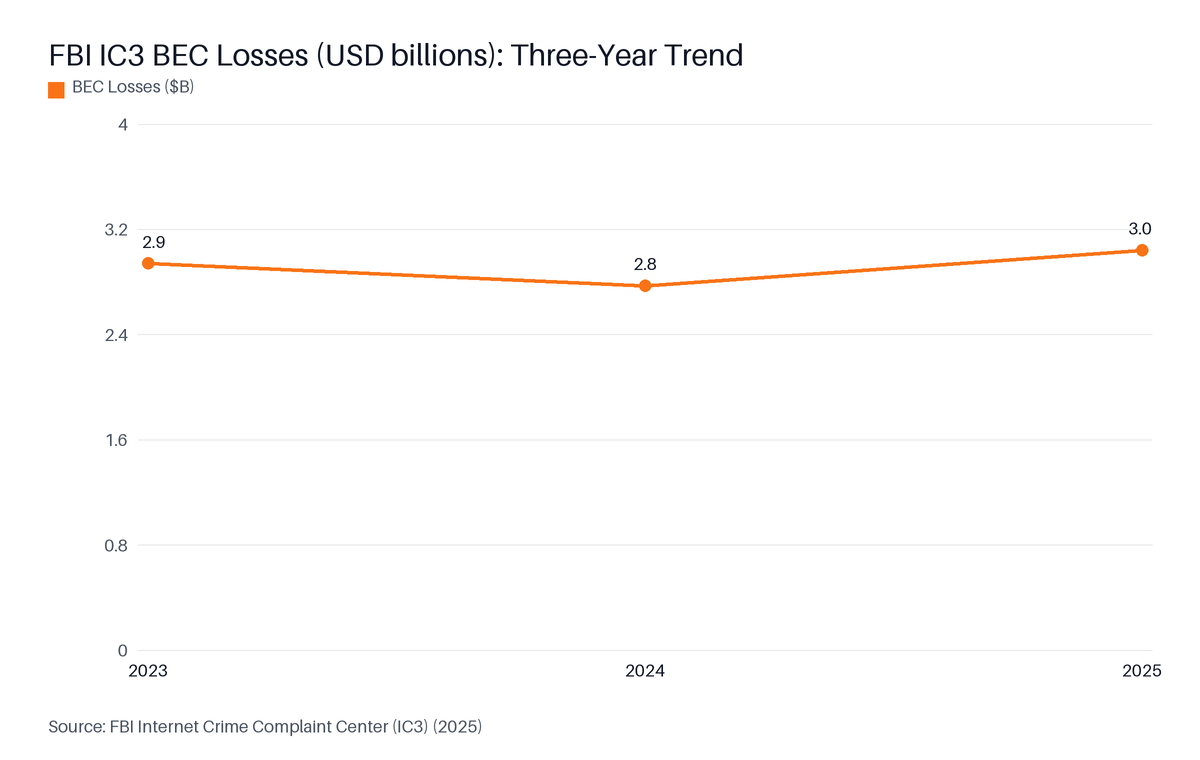
Source: FBI Internet Crime Complaint Center (IC3), 2025
Per Red Sift's analysis of FBI IC3 2025 data, Business Email Compromise losses reached $3.04 billion in 2025, up from $2.77 billion in 2024 (Red Sift, 2025). Phishing losses specifically grew 208% year-over-year - from $70 million to $215.8 million - while complaint volume stayed nearly flat. Unauthenticated domains are the primary attack surface.
On the adoption side, progress is real. As EasyDMARC's 2025 Adoption Report documented: "DMARC adoption among top domains increased from 27.2% to 47.7% between 2023 and 2025-a 75% surge in protected domains." (EasyDMARC, 2025). In 2024, 53.8% of surveyed email senders reported using DMARC, up from 42.6% in 2023-an 11-percentage-point jump attributed directly to Google and Yahoo's bulk-sender requirements (Mailgun, 2025).
Regional data reflects the same trend. Among .fr domains tracked by AFNIC, combined SPF, DMARC and DKIM adoption climbed from 52.5% in 2023 to 66.2% in 2024 and 69.0% in 2025 (AFNIC, 2025), illustrating the acceleration that followed Google and Yahoo's bulk-sender deadlines.
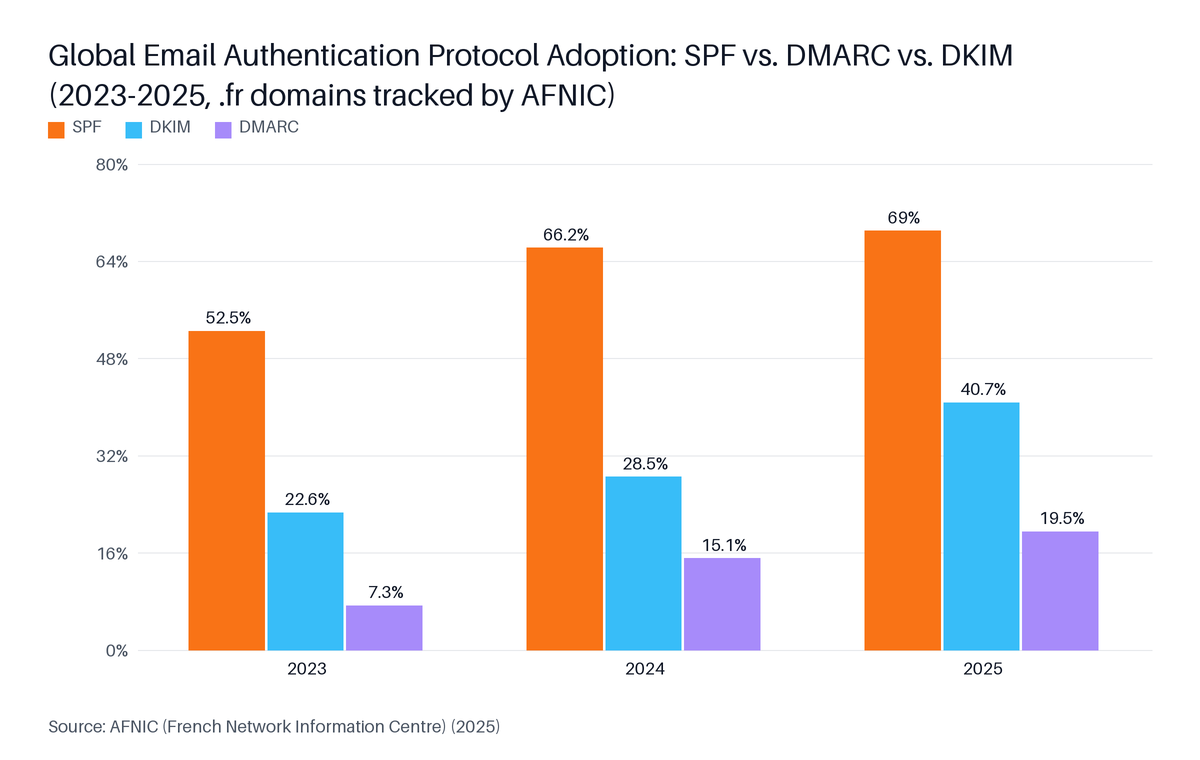
Source: AFNIC (French Network Information Centre), 2025
The problem is that adoption and enforcement are not the same thing. Only 37% of senders using DMARC are enforcing it with p=quarantine or p=reject (Mailgun, 2025). For outbound sales teams and RevOps practitioners, this creates a specific risk: a domain at p=none with a misconfigured SPF record sends mail that appears to pass DMARC monitoring while actually failing at receiving servers - and that failure is invisible until delivery rates drop.
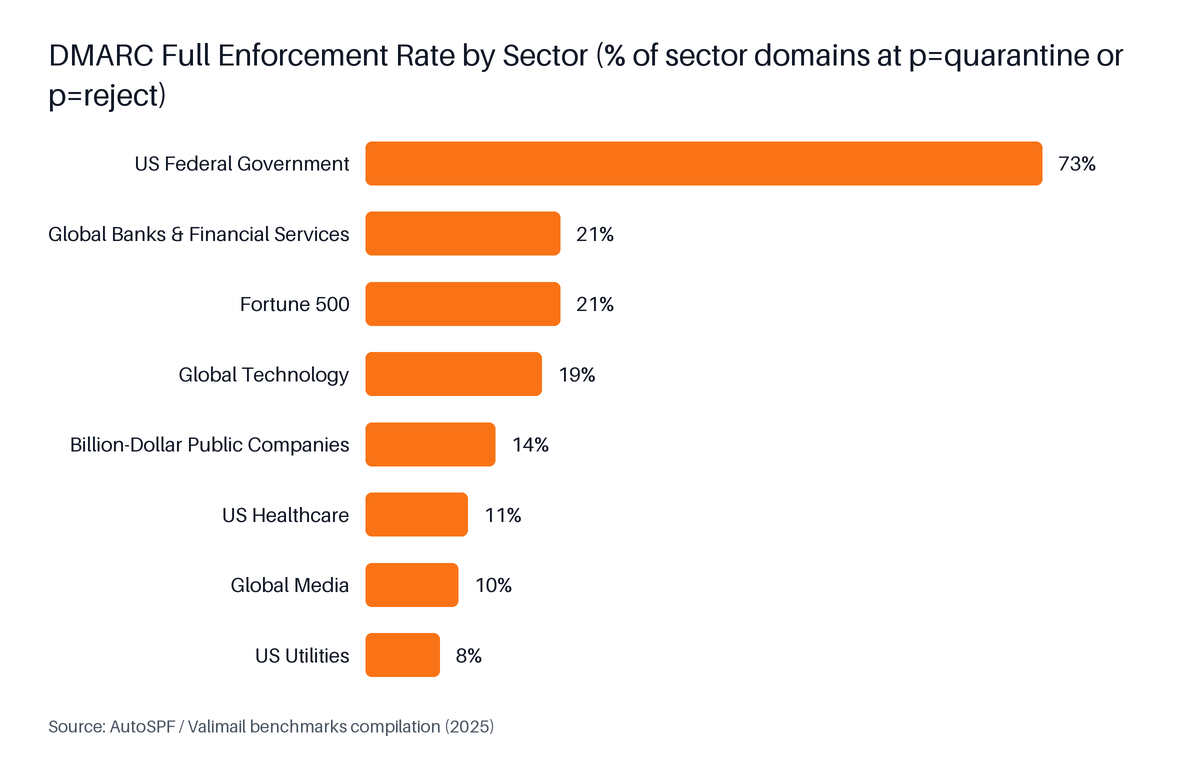
Source: AutoSPF / Valimail benchmarks compilation, 2025
The February 2024 deadline and the November 2025 enforcement wave are two distinct events that many setup guides conflate:
| Date | What Changed |
|---|---|
| February 2024 | Google and Yahoo announced bulk-sender requirements: SPF and DKIM required; DMARC at p=none minimum for senders of 5,000 or more messages per day. Non-compliant mail routed to spam. |
| November 2025 | Gmail escalated to hard enforcement. As Google confirmed: "Starting November 2025, Gmail is ramping up its enforcement on non-compliant traffic." (Google / Valimail, 2025). Non-compliant senders now face rejection, not spam routing. |
If you configured authentication before February 2024 and have not checked it since, verify that your records are still intact. DNS records can be accidentally deleted during domain migrations.
The correct Google Workspace SPF record is a single DNS TXT record published on your root domain (@) with the value: v=spf1 include:_spf.google.com ~all. This record authorizes Google's mail servers to send on your domain's behalf. Each domain may have exactly one SPF TXT record. If you also send through Salesforce or Outreach, merge all senders into this one record. Google Workspace's include:_spf.google.com consumes approximately 4 of your 10 permitted DNS lookups.

Google's official bulk-sender guidelines (Google, 2024; confirmed by Valimail, 2025) require senders of 5,000 or more messages per day to authenticate with both SPF and DKIM. SPF alone is not sufficient for bulk senders. For lower-volume senders, SPF still provides a baseline that improves deliverability and protects against spoofing.
Follow these steps for any DNS provider (GoDaddy, Cloudflare, Namecheap, Route 53 or similar):
@) with v=spf1 in its value. If one exists, edit it rather than creating a new one.v=spf1 include:_spf.google.com ~allv=spf1 include:_spf.google.com include:_spf.salesforce.com ~allv=spf1 include:_spf.google.com include:spf.outreach.io ~allEach domain may have exactly one SPF TXT record. Publishing a second v=spf1 record on the same domain causes a PermError - both records are ignored and SPF fails for every message. If you inherited a domain with an existing SPF record that does not include _spf.google.com, edit the existing record and add the include: mechanism. Do not create a new record.
| Ending | Name | Behavior | When to Use |
|---|---|---|---|
~all | Softfail | Accept but flag mail from unlisted servers | Default starting point; safer during transitions |
-all | Hardfail | Reject mail from unlisted servers | After confirming all legitimate senders are listed |
?all | Neutral | No policy on unlisted servers | Rarely used; provides no protection |
Start with ~all. Move to -all only after your DMARC reports show no unexpected legitimate sources sending from your domain.
DKIM (DomainKeys Identified Mail) for Google Workspace is generated inside the Google Admin Console under Apps, then Google Workspace, then Gmail, then Authenticate email. Select your domain, choose a 2048-bit key length, and click Generate new record. Google provides a TXT record name and the public key string. Publish both in your DNS provider, return to the Admin Console and click Start authentication. Allow up to 48 hours for propagation before verifying.
Google's guidelines (Google, 2024) require DKIM alongside SPF for all bulk senders of 5,000 or more messages per day. A DKIM-only or SPF-only setup does not satisfy the requirement at that volume tier.
admin.google.com (requires super-admin access).google._domainkey - your DNS provider prepends your domain, making the full name google._domainkey.yourdomain.com.v=DKIM1; k=rsa; p=...google._domainkeyv=DKIM1; k=rsa; p=... string from the Admin ConsoleUse a 2048-bit DKIM key rather than 1024-bit. The 1024-bit key length is considered weak by current cryptographic standards. Some receiving servers treat it as a risk signal. Google's Admin Console offers both options - always choose 2048-bit for new configurations.
To add a DMARC record on GoDaddy, log in, open your domain's DNS management page, and add a TXT record with Host set to _dmarc, TTL set to 3600 seconds, and Value set to your DMARC policy string. A safe starting value is: v=DMARC1; p=none; rua=mailto:dmarc-reports@yourdomain.com. Since April 2025, GoDaddy automatically adds a p=quarantine DMARC record to newly purchased domains (Valimail, 2025) - check for an existing record before creating a new one to avoid duplicates.
GoDaddy has become one of the first major domain registrars to add a DMARC record by default on all newly purchased or transferred domains since April 2025, setting it to p=quarantine (Valimail, 2025). Only 37% of senders using DMARC have moved to an enforcement policy (Mailgun, 2025) - so GoDaddy's default p=quarantine setting puts new-domain owners at enforcement from day one, which most are not prepared for.
This change affects two groups of GoDaddy customers differently:
| Situation | What GoDaddy Did | What You Must Do |
|---|---|---|
| Domain purchased or transferred after April 2025 | Added _dmarc TXT record automatically at p=quarantine | Check the record exists, add your rua= report address, confirm policy matches your readiness |
| Domain purchased before April 2025 | No default record added | Create the DMARC record manually using the steps below |
p=quarantine means mail that fails DMARC is immediately sent to spam. If your SPF or DKIM is not yet fully configured, a newly purchased GoDaddy domain can start quarantining your own legitimate mail before you realize there is a problem. Verify both SPF and DKIM are working before the default p=quarantine takes effect - or temporarily lower the policy to p=none until your setup is confirmed.
godaddy.com._dmarc. If one exists, click Edit rather than Add._dmarcv=DMARC1; p=none; rua=mailto:dmarc-reports@yourdomain.comReplace dmarc-reports@yourdomain.com with a real mailbox you can access. DMARC aggregate reports arrive as XML files attached to daily email digests and are the primary tool for identifying authentication failures before you tighten your policy.
To check whether DMARC is set up correctly on your domain, run it through MXToolbox's free DMARC Lookup at mxtoolbox.com/dmarc.aspx and the Google Admin Toolbox Check MX at toolbox.googleapps.com/apps/checkmx. Both tools query your live DNS and report whether a valid DMARC TXT record exists and which policy is active. The global DMARC pass rate reached 88.99% in Q1 2026-meaning roughly 1 in 9 emails still fails (TechnologyChecker.io, 2026) - making post-setup verification worth the two minutes it takes.

Run through these checks in sequence after publishing or updating any authentication record:
mxtoolbox.com/spf.aspx): Enter your domain. Confirms whether your SPF record exists, counts your DNS lookups (flags if you exceed 10), and highlights syntax errors.mxtoolbox.com/dkim.aspx): Enter your domain and selector (for Google Workspace: google). Confirms whether the public key is published and readable.mxtoolbox.com/dmarc.aspx): Enter your domain. Confirms whether the record exists, identifies the active policy, and validates syntax.toolbox.googleapps.com/apps/checkmx): Checks MX, SPF and DMARC records together from Google's resolver. Useful for confirming what Gmail specifically sees.Once your p=none DMARC record is live and you have been receiving mail for 24 to 48 hours, mail providers will begin sending aggregate reports (XML files) to the address in your rua= tag. The reports summarize:
What to look for before moving from p=none to p=quarantine:
spf=pass or dkim=passIf you see unfamiliar source IPs in the reports, investigate before tightening your policy. They could be a third-party tool you forgot to add to your SPF record.
Our observation: In our experience, teams that skip authentication before their first outbound campaign often spend weeks rebuilding domain reputation - a cost that a one-time DNS configuration would have avoided. Authentication is the cheapest deliverability fix available.
A DMARC policy is the p= tag in your DMARC TXT record that tells receiving mail servers how to handle messages that fail authentication: p=none monitors without acting, p=quarantine routes failures to spam, and p=reject refuses delivery entirely. DMARC alignment is the requirement that the domain in the email's From: header matches the domain authenticated by SPF or DKIM. Only 37% of senders using DMARC have moved to an enforcement policy of quarantine or reject (Mailgun, 2025), meaning the majority remain in monitor-only mode.
| Policy | Tag Value | Effect on Failing Mail | When to Use |
|---|---|---|---|
| Monitor | p=none | Delivered normally; report sent | Starting point for all new setups |
| Quarantine | p=quarantine | Moved to spam or junk folder | After reports confirm all legitimate senders pass |
| Reject | p=reject | Refused at the receiving server | After weeks of clean reports at quarantine; maximum protection |
Never skip p=none. Moving directly to p=quarantine or p=reject without a monitoring period frequently causes legitimate mail to be blocked - typically transactional emails sent by a third-party service that was never added to your SPF record.
DMARC alignment is the requirement that the domain in the email's From: header matches the domain that SPF or DKIM authenticated. It has two modes:
adkim=r; aspf=r): The organizational domain must match. A message from mail.yourdomain.com passes alignment for yourdomain.com. This is the correct setting for most Google Workspace senders.adkim=s; aspf=s): An exact domain match is required. A message from mail.yourdomain.com fails alignment for yourdomain.com unless mail.yourdomain.com has its own SPF and DKIM records.If you send outbound campaigns from a subdomain - for example, sales.yourdomain.com - relaxed alignment allows the DMARC record on the parent domain to cover those sends. Strict alignment fails subdomain senders unless each subdomain has its own records.
The DMARC record carries two reporting tags:
ruf= tag for privacy reasons; it is optional.A practical starting DMARC record for a Google Workspace domain:
v=DMARC1; p=none; adkim=r; aspf=r; rua=mailto:dmarc-reports@yourdomain.com; pct=100
pct=100 means the policy applies to 100% of failing mail. At p=none the pct= tag has no effect on delivery - it only matters when you move to quarantine or reject.
The SPF specification limits each domain to 10 recursive DNS lookups per authentication check. Google Workspace's include:_spf.google.com consumes approximately 4 of those lookups, leaving 6 for additional services such as Salesforce, Outreach or Salesloft. Exceeding 10 causes a PermError that fails SPF authentication silently - with no bounce or error message to warn you. Audit your lookup count with MXToolbox's SPF Lookup before adding any new sending tool to your stack.
The DNS lookup budget is the SPF specification's limit of 10 recursive DNS lookups per authentication check. Exceeding it produces a PermError. The entire SPF evaluation is treated as a failure, regardless of whether the sending IP would have been authorized. The failure is silent: nothing in your outbox or bounce logs tells you it happened.
As of December 2025, only 2.5% of domains in a 73.3-million-domain sample enforce p=reject (Red Sift, 2025). Most teams still have room to tighten their DMARC policy - but an SPF lookup audit is the prerequisite, because a PermError at enforcement stage can silently reject your own mail.
Approximate lookup counts for common services used alongside Google Workspace:
| Service | Approximate Lookups Used |
|---|---|
Google Workspace (include:_spf.google.com) | ~4 |
Salesforce (include:_spf.salesforce.com) | ~1-2 |
Outreach (include:spf.outreach.io) | ~1-2 |
Salesloft (include:spf.salesloft.com) | ~1 |
| Total (all four) | ~7-9 |
Adding one more service can push you over 10. If you run a standard RevOps stack - Google Workspace plus a CRM plus a sequencer - check your lookup count before adding a warmup tool or a marketing ESP.
To reduce lookups, use IP-based ip4: mechanisms for services with stable IP ranges. You can also ask your DNS provider about SPF flattening, which replaces include: chains with direct IP lists.
If your outbound team sends from a subdomain - sales.yourdomain.com, outreach.yourdomain.com - you have two options:
yourdomain.com with adkim=r; aspf=r covers all subdomains, as long as relaxed alignment passes. This works for most Google Workspace setups.v=spf1 record and its own DKIM key. More DNS records to maintain, but provides maximum alignment precision.BIMI (Brand Indicators for Message Identification) is a standard that allows your verified brand logo to appear in Gmail's inbox next to your sender name. It requires a DMARC policy of at least p=quarantine - and most inbox providers require p=reject for the logo to display - plus a Verified Mark Certificate (VMC). For sales teams and agencies sending high-volume outbound, BIMI signals that the sending domain is fully authenticated and legitimate. It is the visible end-state of a complete authentication setup, not a step you take at the beginning.
The most reliable free tools for checking and troubleshooting SPF, DKIM and DMARC records are MXToolbox (mxtoolbox.com) and the Google Admin Toolbox Check MX (toolbox.googleapps.com/apps/checkmx). Both query your live DNS and return plain-language results. Google Postmaster Tools (postmaster.google.com) adds domain-level visibility into spam rates and authentication pass rates from Gmail's perspective, and is free for any verified sending domain.
The global DMARC pass rate reached 88.99% in Q1 2026-meaning roughly 1 in 9 emails still fails authentication (TechnologyChecker.io, 2026). That figure makes ongoing verification with these tools a routine practice, not a one-time check.
| Tool | URL | What It Checks | Best For |
|---|---|---|---|
| MXToolbox SPF Lookup | mxtoolbox.com/spf.aspx | SPF record syntax, lookup count | Initial SPF verification |
| MXToolbox DKIM Lookup | mxtoolbox.com/dkim.aspx | DKIM public key presence | Initial DKIM verification |
| MXToolbox DMARC Lookup | mxtoolbox.com/dmarc.aspx | DMARC record syntax, policy | Initial DMARC verification |
| Google Admin Toolbox Check MX | toolbox.googleapps.com/apps/checkmx | MX, SPF, DMARC from Google's resolver | Confirming what Gmail sees |
| Google Postmaster Tools |
After your records are live and verified, the work is not finished. Treat authentication as infrastructure that needs periodic review:
For outbound sales teams, inbox health monitoring - including SPF, DKIM, DMARC, MX, rDNS and blacklist status - is available in deliverability platforms alongside warmup. skale.email's per-mailbox health dashboard surfaces all six signals before a send, so authentication failures get caught at the infrastructure level rather than discovered after a campaign launches.
The SPF, DKIM and DMARC setup steps in this guide apply specifically to Google Workspace domains used for outbound sending. They are the right starting point for RevOps teams, sales operations managers and outbound agencies configuring new sending domains on Google Workspace. Senders on Microsoft 365, shared hosting email or a marketing ESP such as Mailchimp or SendGrid follow different DKIM setup paths and should consult their provider's documentation.
This guide is not the right starting point if:
google._domainkey record in this guide is specific to Google Workspace.p=quarantine or p=reject, your setup is complete. Use Google Postmaster Tools for ongoing monitoring rather than reconfiguring.Gmail requires all senders who send 5,000 or more messages per day to Gmail addresses to publish a DMARC record at p=none minimum, per Google's bulk-sender guidelines (Google, 2024) fully enforced since November 2025 (Gmail sender requirements, 2025). The minimum accepted record is: v=DMARC1; p=none; rua=mailto:your-report-address@yourdomain.com. Even senders below that volume threshold benefit from publishing DMARC. Start at p=none to collect aggregate reports before progressing to p=quarantine or p=reject.
Yes, each domain may have exactly one SPF TXT record. Publishing a second v=spf1 record causes a PermError that fails SPF entirely. If you send through both Google Workspace and Salesforce, combine all authorized senders into one record: v=spf1 include:_spf.google.com include:_spf.salesforce.com ~all. Each include: mechanism counts against your 10-DNS-lookup budget, so check your total lookup count after merging services using MXToolbox's SPF Lookup tool.
The SPF specification (RFC 7208) limits a domain to 10 recursive DNS lookups per authentication check. Google Workspace's include:_spf.google.com resolves through several nested includes that consume approximately 4 of those 10 lookups. Adding Salesforce, Outreach and Salesloft to the same record can push the total to 8 or 9, leaving little margin. Exceeding 10 causes a PermError that silently fails SPF. Audit your lookup count with MXToolbox's SPF Lookup tool before adding any new sending service.
Most DNS changes propagate within 30 to 60 minutes for the majority of resolvers worldwide. Some DNS providers and cached resolvers can take up to 48 hours to reflect updates, depending on the Time to Live (TTL) value on each record. Run MXToolbox or the Google Admin Toolbox Check MX immediately after saving a record as a baseline check, then verify again after a few hours if the result still shows the previous value.
GoDaddy has automatically added a p=quarantine DMARC record to all newly purchased or transferred domains since April 2025 (Valimail, 2025). Domains purchased before April 2025 are unaffected and still require manual configuration. On new domains, review the auto-generated record: add your rua= report address so you receive aggregate reports, confirm SPF and DKIM are fully configured before p=quarantine causes your own mail to be quarantined, and plan a path to p=reject once reports show a consistent pass rate.
DMARC alignment requires the domain in the email's From: header to match the domain authenticated by SPF or DKIM. Google Workspace uses relaxed alignment by default, which allows subdomain matches: a message sent from sales.yourdomain.com passes alignment for yourdomain.com. Strict alignment (adkim=s; aspf=s) requires an exact domain match and will fail subdomain senders unless each subdomain has its own SPF and DKIM records.
Always start with p=none. This monitor-only mode publishes your DMARC record without affecting mail delivery, so you can collect aggregate reports and identify every source sending email from your domain before enforcement. Once your reports show that all known legitimate senders consistently pass SPF or DKIM with no unexplained failures, move to p=quarantine, then p=reject. Moving directly to p=reject without a monitoring period frequently causes legitimate transactional mail to be rejected.
The rua tag specifies the mailbox where mail providers send aggregate XML reports summarizing SPF and DKIM pass and fail counts for your domain each day. The ruf tag specifies the mailbox for forensic reports, which contain headers or full copies of individual failed messages. Aggregate reports (rua) are supported by Gmail, Yahoo and Microsoft and are the primary monitoring tool. Forensic reports (ruf) are less widely supported and may contain message content, so many senders omit the ruf= tag for privacy reasons.
A complete Google Workspace authentication setup requires three DNS records: one SPF TXT record at your root domain authorizing include:_spf.google.com, one DKIM TXT record at google._domainkey.yourdomain.com generated from the Admin Console with a 2048-bit key, and one DMARC TXT record at _dmarc.yourdomain.com starting at p=none with a valid rua= address. Each record is independent, but all three must be present and passing for Gmail and Yahoo to treat your domain as fully authenticated.
The practical sequence: set up SPF first (a single record edit), generate and publish DKIM second (requires Admin Console access), add DMARC third at p=none, verify with MXToolbox and the Google Admin Toolbox, then monitor your aggregate reports for 2 to 4 weeks before moving to p=quarantine. For GoDaddy domains purchased after April 2025, check for an auto-generated DMARC record before creating a new one.
Authentication is the floor, not the ceiling. Once your records are clean, the next layer of deliverability work is inbox health monitoring - tracking SPF, DKIM, DMARC, MX, rDNS and blacklist status across every sending mailbox before a campaign goes out. Start with the skale.email free trial to monitor your domain health and warm up your mailboxes alongside your authentication setup.
Continue learning - topics in this cluster:
Written by
Subramanya Kamath
Subramanya Kamath is the Chief Executive Officer and Co-founder of Targetgrid. He helps teams grow with B2B SaaS sales technology and AI engagement tools. He also serves as a startup consultant, guiding founders on go-to-market strategy, lead pipelines, and sales automation.
postmaster.google.com| Domain reputation, spam rate, auth pass rate |
| Ongoing monitoring |