
Blog
Does Email Warm Up Work? What It Fixes, What It Can't, and Who Can Skip It
Does email warm up work? See what warmup fixes, what it can't, who can skip it and what happens if you stop, using 2025 and 2026 provider and benchmark data.

How to warm up email in four weeks: setup order, a week-by-week schedule, stop-and-hold limits and a realistic date for your first cold campaign.
 Subramanya KamathNov 8, 2026

Does email warm up work? See what warmup fixes, what it can't, who can skip it and what happens if you stop, using 2025 and 2026 provider and benchmark data.
Your domain landed on a blacklist after a volume jump. Learn how to check Spamhaus, submit removal requests, and rebuild sender reputation step by step.
Step-by-step guide to adding the right SPF record for Google Workspace, configuring DKIM and DMARC on GoDaddy, and verifying your setup with free tools.
Request a quote and our experts will contact you within 24 hours with tailored solutions and pricing.
You can also send us a quick email at support@skale.email.
Last updated: Nov 8, 2026
By Subramanya Kamath, CEO and Co-founder of Targetgrid, who advises startups on go-to-market strategy, lead pipelines and sales automation. Last updated October 22, 2026.
Email warmup is the process of building sender reputation on a new mailbox by sending a small, steadily rising volume of genuine-looking email, so providers learn to trust the address before your first campaign. Rules have tightened: Microsoft began rejecting non-compliant bulk mail outright with error 550 5.7.515 on May 5, 2025 (Red Sift, 2026). A new mailbox has no history, so one bad first send can cost weeks. This guide shows how to warm up email step by step: setup order, a week-by-week schedule, stop-and-hold limits, a two-mailbox example and a realistic timeline. For the wider picture, read what email deliverability means.
Key Takeaways
- Email warmup works in this order: authenticate the domain with SPF, DKIM and DMARC, create and verify the mailbox, then start at 5 to 10 sends a day.
- A four-week ramp of 5 to 10, 10 to 20, 20 to 30 and 30 to 50 emails a day per mailbox is a common practitioner schedule, not measured fact.
- Hold the ramp whenever bounce rate passes 2%, or when user-reported spam rate nears the 0.10% ceiling that Google and Yahoo recommend (Red Sift, 2026).
- Plan on at least four weeks before a full campaign, and about six weeks for a domain registered in the last 90 days.
- Email warmup is one input in a deliverability setup. It cannot fix a bad list or spammy copy.
To warm up an email account, work in this order: register the domain, publish Sender Policy Framework (SPF), DomainKeys Identified Mail (DKIM) and DMARC records, create the mailbox, and verify the records. Then send 5 to 10 messages a day and raise volume weekly. A gated ramp only advances while bounce rate stays under 2% (TrulyInbox, 2026).

Sender reputation is the track record mailbox providers keep for your domain and address, built from bounces, spam reports and recipient behavior. A new mailbox has none, so providers treat it as risky by default. Warmup is how you build that record on purpose. One vendor guide puts the rule plainly: "Authenticate first. SPF, DKIM and DMARC must pass before the first send" (TrulyInbox, 2026).
Bounce rate is the share of sent emails that the receiving server rejects as undeliverable. Spam rate is the share of delivered emails that recipients report as spam. Both gate the ramp.
Bounces mostly come from your list. Saleshandy's analysis of 30.31 million cold emails found bounce rates of 1.21% for valid addresses, 2.11% for unverified, 2.22% for risky and 10.58% for bad addresses (Saleshandy, 2026). Verify your list before the first campaign, because one bad batch can undo weeks of ramping.
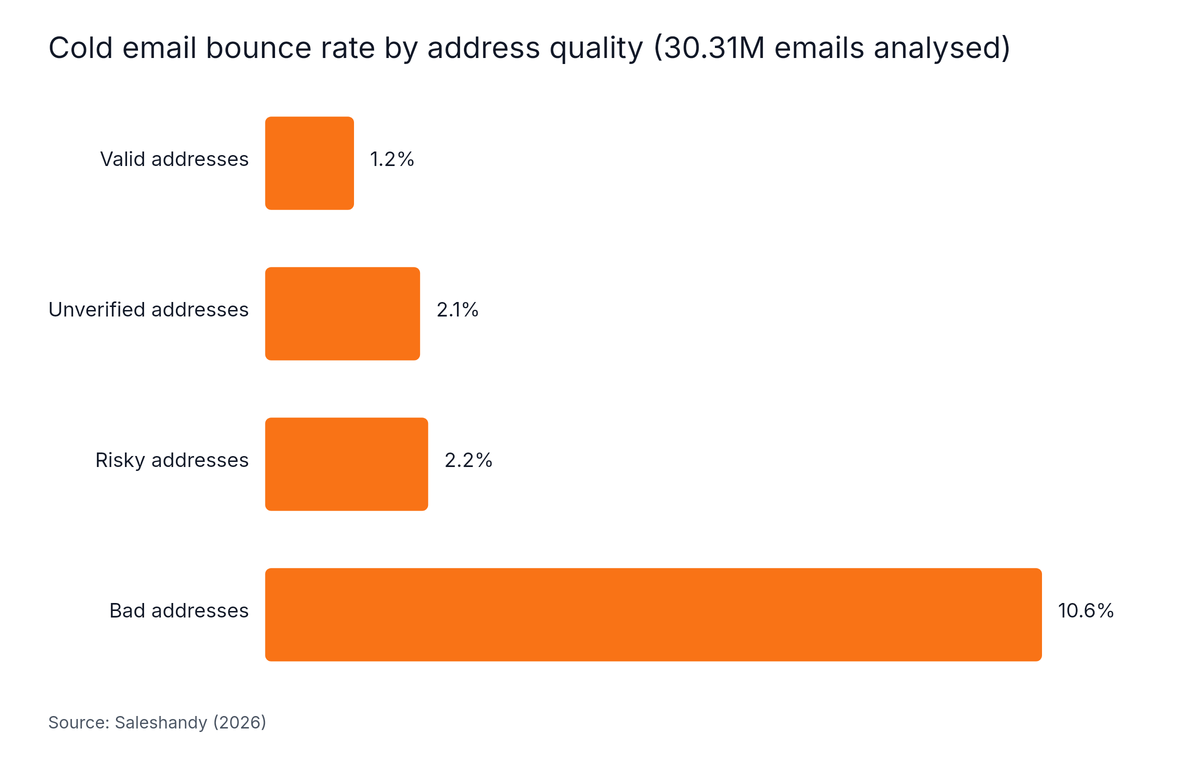
Source: Saleshandy, 2026
Warming up an inbox for cold email involves three things: authenticating the domain, sending rising volumes of genuine-looking mail, and watching spam and bounce signals before any prospect hears from you. Inbox rates differ by provider: Outlook 66%, Gmail 62% and Yahoo and AOL 22% in Unspam's January to September 2026 tests (Unspam, 2026).
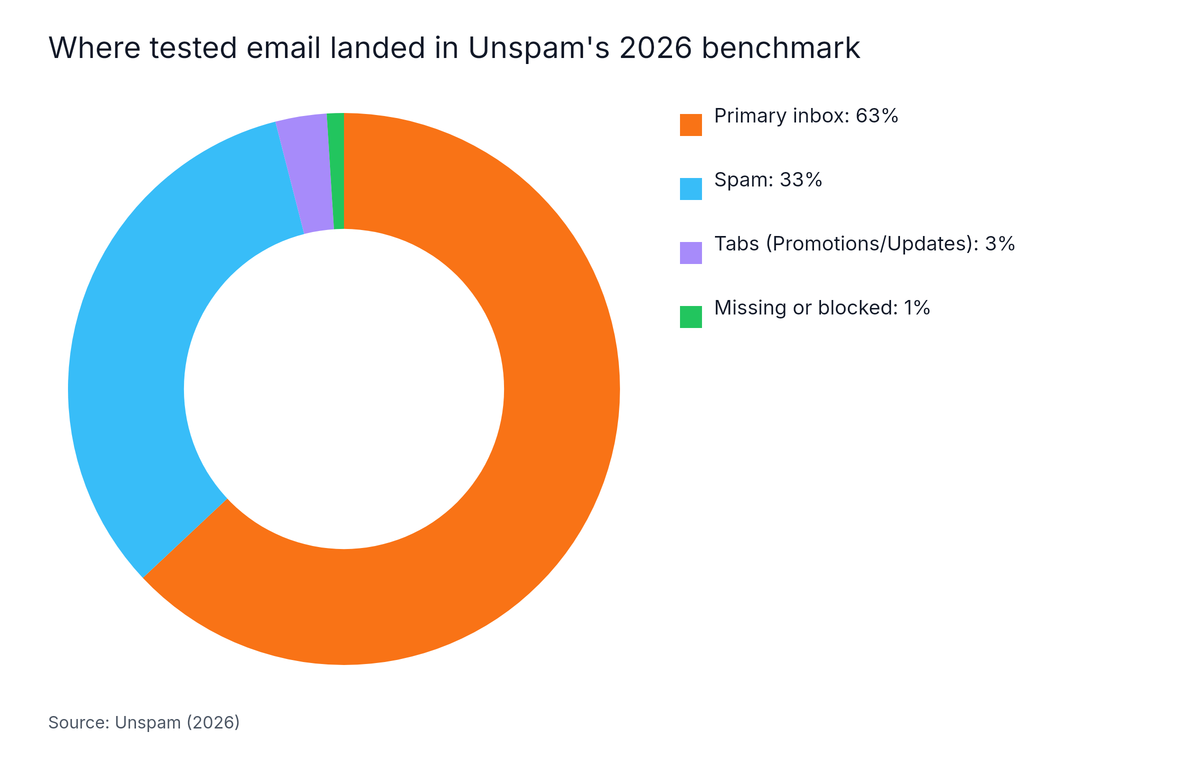
Source: Unspam, 2026
For context, these benchmarks cover all tested email, not cold email specifically. In Unspam's 2026 benchmark, 63% of tested email reached the primary inbox, 33% went to spam, 3% landed in tabs and 1% went missing or was blocked (Unspam, 2026). The report's author notes: "Mail reached the primary inbox more often in 2026 than in 2025, 63% of tested email against 49%" (Unspam, 2026). Because provider results differ so sharply, warm up and monitor per provider.
Microsoft began enforcing SPF, DKIM and DMARC for high-volume senders on May 5, 2025. As of 2026, Google, Yahoo and Microsoft all enforce their bulk-sender rules (Red Sift, 2026). The formal threshold is 5,000 messages a day, far above a founder's volume. Authenticate anyway. Providers look at the same signals for small senders.
A warmup tool automates the ramp and spreads sends across a network of mailboxes. The counter-view is worth knowing. Mailgun warns that tools relying on synthetic engagement networks are increasingly detected. Its advice: "Gradually ramping up volume gives them time to observe your sending behavior and see how real recipients respond to your mail." (Mailgun, 2026). Software vendors, including the publisher of this guide, have a stake in this question, so weigh each side.
| Approach | Best for | Main risk |
|---|---|---|
| Manual warmup with real contacts | One or two mailboxes | Time spent, uneven volume |
| Warmup tool only | Many mailboxes, tight schedules | Synthetic engagement can be detected |
| Hybrid: tool for the ramp, real contacts for threads | Most founders | Two systems fighting over one daily quota |
If you use a tool, see what a warmup sequence actually sends and how AI warmup tools compare.
A safe email warmup schedule runs four weeks per mailbox: 5 to 10 emails a day in week one, 10 to 20 in week two, 20 to 30 in week three and 30 to 50 in week four, with small cold tests starting in week three (Leadhaste, 2026). Increase by 3 to 5 emails a day, never faster.

A ramp curve is the planned, gradual increase in daily send volume over the warmup period. The table below combines the Leadhaste ramp with the readiness gates from TrulyInbox (TrulyInbox, 2026). Treat it as practitioner convention, because neither guide publishes a sample. The cold sends are part of the total, not added on top of it.
| Week | Total sends per mailbox per day (cold included) | Of which cold | Gate to move on |
|---|---|---|---|
| 1 | 5 to 10 | None | Authentication passes, no errors |
| 2 | 10 to 20 | None | Bounce under 2%, no spam placement |
| 3 | 20 to 30 | 5 to 10 test sends | Bounce and spam signals still clean |
| 4 | 30 to 50 | A larger share, only if gates hold | Inbox placement stable for 5+ days at target volume |
The chart below plots the low end of each Leadhaste weekly range: 5, 10, 20 and 30 emails a day.
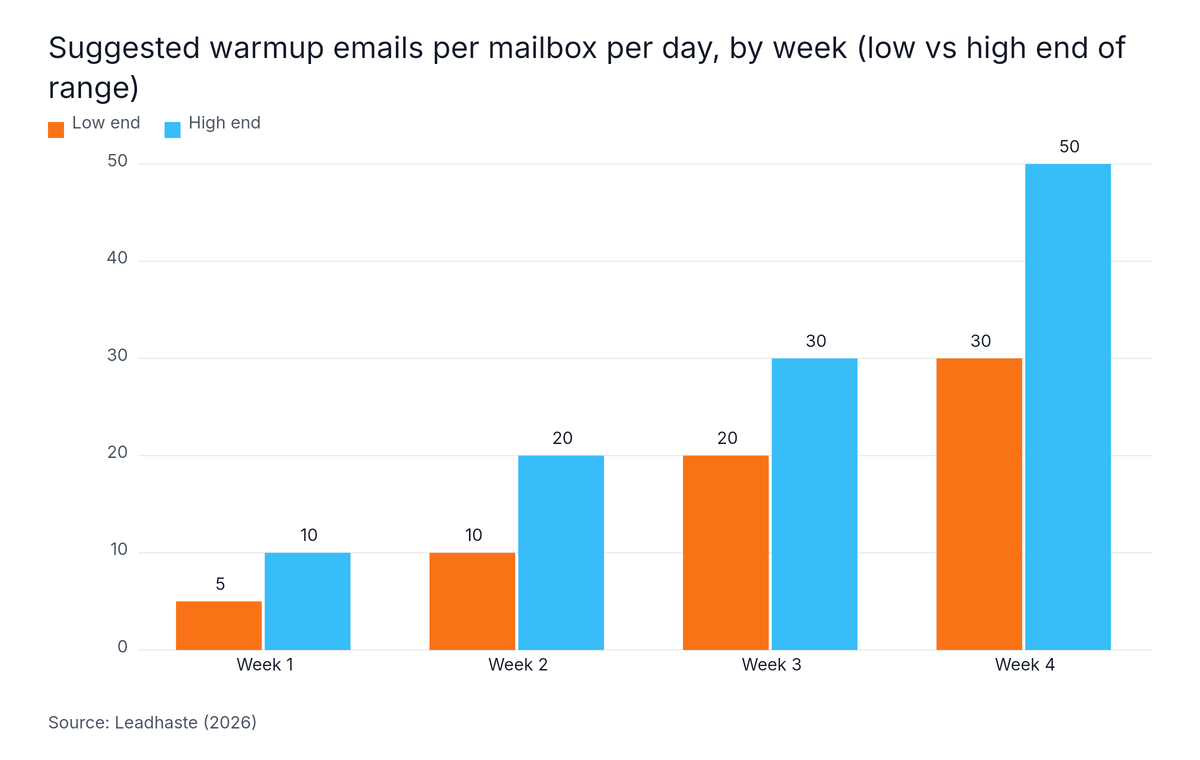
Source: Leadhaste, 2026
Week-four advice varies widely, and most of it is unsourced. Leadhaste tops out at 30 to 50 emails a day per mailbox. TrulyInbox's schedule reaches about 50 a day by week four, as the chart below shows, at points of 5, 15, 30 and 50 across weeks one to four.
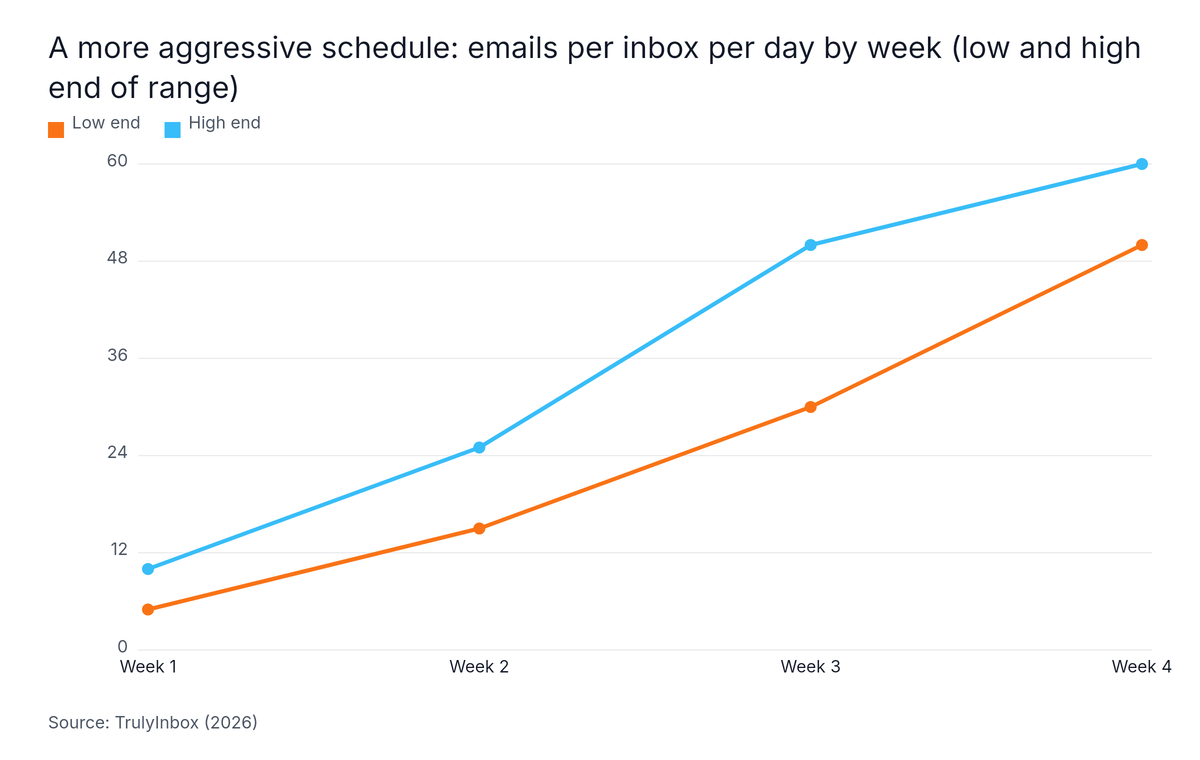
Source: TrulyInbox, 2026
TrulyInbox separately lists 50 to 60 a day in week four, and that figure applies to warm contacts only (TrulyInbox, 2026). It is not a cold-sending target. Our interpretation, not a sourced finding: the gap likely comes from two things. Some guides count per mailbox and others per domain. Others describe bulk newsletter warmup, which has different ceilings from one-to-one cold outreach. For a founder, use the lower per-mailbox range and add mailboxes instead of pushing one.
Most guides say "monitor." Use numbers instead. When a signal turns red, hold the volume. If it stays red for several days, drop back to the previous week's level.
| Signal | Go | Hold |
|---|---|---|
| User-reported spam rate | Below 0.10% (Red Sift, 2026) | Near 0.10%, and never reach 0.30% (Red Sift, 2026) |
| Bounce rate | Under 2% (TrulyInbox, 2026) | At or above 2%: pause cold sends, clean the list |
| Inbox placement | Stable for 5+ days (TrulyInbox, 2026) | Any slide: no increase |
Do not trust one good week. Gmail inbox placement in Unspam's 2026 tests moved from 73.7% in January to a 77.3% peak in February and 51.7% in August (Unspam, 2026).
Picture a solo founder who registers one cold domain and creates two mailboxes. DNS is verified, and warmup starts Monday, November 2, 2026. The dates and totals below are illustrative arithmetic on the ranges above, not a measured result.
| Week starting | Per mailbox per day | Of which cold, per mailbox | Domain total per day (2 mailboxes) |
|---|---|---|---|
| Nov 2 | 5 to 10 | None | 10 to 20 |
| Nov 9 | 10 to 20 | None | 20 to 40 |
| Nov 16 | 20 to 30 | 5 to 10 | 40 to 60 |
| Nov 23 | 30 to 50 | Only if gates hold | 60 to 100 |
Two mailboxes give the founder more capacity without pushing either one past its own range. In week three, the two mailboxes together carry 10 to 20 cold test sends a day. The founder checks the tripwire table each morning, logs every increase, and holds the volume on any red signal. If everything stays green, the first full campaign can start around November 30. If the domain is under 90 days old, plan for about December 14.
A realistic domain warmup timeline is at least four weeks for standard mailboxes and about six weeks for domains registered in the previous 90 days (EmailBison, 2026). A first small cold test can start in week three. A full campaign should wait until placement and bounce rates hold steady at target volume.

| Situation | Timeline | Source |
|---|---|---|
| Standard mailbox | At least 4 weeks | EmailBison, 2026 |
| Domain registered in the last 90 days | About 6 weeks | EmailBison, 2026 |
| First small cold test | Week 3, 5 to 10 a day | Leadhaste, 2026 |
| Full campaign | After 5+ stable days at target volume | TrulyInbox, 2026 |
These timelines are vendor recommendations, not measured data. As an illustration only, in the two-mailbox example above, a standard mailbox started on November 2 would be ready around November 30, 2026 (four weeks later). A domain registered in the last 90 days would be ready around December 14, 2026 (six weeks later).
Call a mailbox ready when all of these hold:
Set expectations for the result too. Saleshandy's analysis of 30.31 million cold emails found an average reply rate of 4.5% (Saleshandy, 2026). Warmup protects that number. It does not raise it. For more timeline scenarios, read how long email warmup takes.
To warm up a single email address, send from it the way one person would: authenticate its domain, keep its name and signature fixed, start at 5 to 10 messages a day, and stay far below provider caps. On Microsoft 365, each mailbox is hard-capped at 10,000 recipients per day and 30 messages per minute (Microsoft Learn, 2026).
Microsoft 365's sending caps are not negotiable. Microsoft's documentation says: "The recipient rate limit and message rate limit are hard limits enforced at the service level and can't be increased." (Microsoft Learn, 2026). Your warmup volumes should sit far below them.
Each address builds its own reputation, so a single mailbox needs its own routine:
| Provider rule | Published figure | What it means for one address |
|---|---|---|
| Microsoft 365 mailbox limit | 10,000 recipients per day, 30 messages per minute | A hard ceiling, never a warmup target |
| Microsoft 365 trial tenant | 5,000 external recipients per day (Microsoft Learn, 2026) | Avoid starting cold email on a trial |
| Outlook.com bulk rule | SPF, DKIM, DMARC required at 5,000+ messages a day since May 5, 2025 (Red Sift, 2026) | Authenticate from day one |
| Gmail and Yahoo guidance | Spam rate below 0.10%, never 0.30% (Red Sift, 2026) | Use as your pause line |
Google's own sending caps for Gmail and Google Workspace belong on Google's help pages, so check them there before you set a ceiling. For Outlook, Zoho and custom SMTP setups, see warming up Microsoft 365 and SMTP mailboxes. If you are budgeting several domains and inboxes, cold email infrastructure costs are broken down separately.
Email warmup for one-to-one cold outreach is not suited to bulk newsletter senders, domains already on a blocklist, or anyone expecting it to fix bad data or weak copy. Mailgun warns that warmup tools relying on synthetic engagement are increasingly detected (Mailgun, 2026), and no schedule can guarantee inbox placement. Every volume figure here is practitioner guidance, not measured fact.

Email warmup for cold campaigns is set up in four moves: authenticate the domain with SPF, DKIM and DMARC, connect each mailbox to your warmup process, set a ramp that starts at 5 to 10 emails a day, and add a stop rule if bounce rate passes 2% (TrulyInbox, 2026). Hold real prospects until week three at the earliest.
The best email warmup schedule is a gated four-week ramp per mailbox: 5 to 10 emails a day in week one, 10 to 20 in week two, 20 to 30 in week three and 30 to 50 in week four (Leadhaste, 2026). Move up only while bounces stay under 2% and nothing lands in spam.
A safe email domain warming schedule raises daily volume in small steps instead of big jumps: start near 5 emails a day, add 3 to 5 emails at each step, and hold on any day a metric turns bad (Leadhaste, 2026). Spread the plan across weekdays, and check bounces and spam placement each morning.
A new mailbox should send 5 to 10 warmup emails a day in week one and 30 to 50 by week four (Leadhaste, 2026). Increase only when bounce rate is under 2% and inbox placement has been stable for 5 or more days at the current volume (TrulyInbox, 2026).
A new mailbox can send a small number of cold emails during warmup, but only from week three: roughly 5 to 10 a day per mailbox, and only if bounce and spam signals are clean (Leadhaste, 2026). In weeks one and two, a new mailbox should send warmup mail only, because it has no sending history to protect a bad first batch.
Warming up email is a short, disciplined routine, not a trick. Keep these points:
Your next step: register the cold domain this week, publish the three records, and write down your start date and gates before you send anything. To compare monitoring and testing options, see best email deliverability tools.
Disclosure: this guide is published by skale.email, which sells automated warmup software. If you would rather automate the ramp, limits and health checks, you can start warming up free with skale.email.
Written by
Subramanya Kamath
Subramanya Kamath is the Chief Executive Officer and Co-founder of Targetgrid. He helps teams grow with B2B SaaS sales technology and AI engagement tools. He also serves as a startup consultant, guiding founders on go-to-market strategy, lead pipelines, and sales automation.
© 2026 skale.email All rights reserved.